 Whatsable







Most business teams glance at those two blue checkmarks and think “great, they saw it.” Then they move on. WhatsApp read receipts are far more than a social signal or a privacy debate. When you integrate them into your messaging infrastructure through the WhatsApp Business API, they become real-time event triggers that can fire automated workflows, gate follow-up sequences, and feed into your customer engagement analytics.
Table of Contents
- Understanding WhatsApp read receipts: More than a privacy toggle
- Read receipts as automation drivers: Workflow and engagement
- Measuring performance: Linking read receipts to outcomes
- Implementation best practices: Avoiding common pitfalls
- A fresh perspective: Why read receipts are often misunderstood in business automation
- Frequently asked questions
Key Takeaways
| Point | Details |
|---|---|
| Read receipts enable automation | WhatsApp read receipts can trigger workflow actions like reminders and escalations when used in business automation. |
| Visibility, not just performance | Read rates show message visibility and should be measured alongside response and conversion metrics for greater business insight. |
| Avoid duplicates and disorder | Reliable automation requires state-machine logic to handle duplicate and out-of-order event delivery. |
| Use actionable triggers | Treat read receipts as triggers for next steps, not simply as reporting metrics, to improve customer engagement. |
Understanding WhatsApp read receipts: More than a privacy toggle
In a personal WhatsApp chat, read receipts tell you whether your friend saw your message. In a business environment, they tell you something far more actionable: a specific customer, at a specific timestamp, opened a specific message.
Within the WhatsApp Business API, every outbound message passes through a sequence of status events. Understanding these events is the foundation for everything else in this guide.
The three core message status events are:
- Sent: The message left your system and reached WhatsApp’s servers. This confirms delivery to the platform, not to the device.
- Delivered: WhatsApp confirmed the message reached the recipient’s device. The recipient may not have opened the app yet.
- Read: The recipient opened the conversation and the message was displayed. This is the event that carries the most behavioral signal.
Each of these events arrives as a webhook payload, meaning WhatsApp pushes the status update to your server in near real-time. You don’t need to poll an API repeatedly to check whether a message was seen. The status event arrives automatically, carrying the message ID, the recipient’s phone number, and a timestamp.
The read event is not just a data point. It’s a signal that a real person has engaged with your content, and your system can respond to it immediately.
Read receipts as automation drivers: Workflow and engagement
Once you recognize read receipts as event signals rather than passive data, the automation possibilities open up quickly. The core idea is straightforward: treat the transition from “delivered” to “read” as a state change that gates the next step in your workflow.

Here’s what that looks like in practice. Imagine you send a payment reminder to a customer. If the message is delivered but not read after 24 hours, your system escalates to a phone call or a different channel. If the message is read but the customer doesn’t respond or take action within a defined window, your system sends a softer follow-up. If the message is read and the customer responds, the workflow closes that thread and moves to the next stage. Each path is triggered by a different state, and read receipts define one of those critical states.
A typical sequence of actions gated by read receipt events looks like this:
- Message sent: Your system logs the message ID and sets the initial state to “pending.”
- Delivered event received: State updates to “delivered.” A timer starts for the read window.
- Read event received: State updates to “read.” A new timer starts for the response window. The escalation path is paused.
- No response after the read window expires: The system fires a follow-up message, adjusted in tone because you now know the customer saw the original.
- Response received: The workflow transitions to the next stage, such as booking confirmation or support ticket creation.
Pro Tip: Build idempotent logic for every read receipt handler. Idempotent means that processing the same event twice produces the same result as processing it once. Because webhook events can arrive out of order or be duplicated, your system needs to handle a “read” event arriving before a “delivered” event without breaking the workflow state.
Measuring performance: Linking read receipts to outcomes
Read receipts give you visibility. But visibility alone doesn’t pay for your marketing budget. To connect messaging activity to actual business outcomes, you need to place read receipts in context alongside other funnel metrics.
The read rate formula is simple: divide the number of messages with a confirmed read event by the total number of messages delivered, then multiply by 100. A 70% read rate means 7 out of every 10 delivered messages were opened. That sounds good, but it tells you almost nothing about whether your campaign is working.
Practitioners commonly treat read receipts as one step in a funnel alongside response rate and conversion, rather than the primary KPI. Here’s why that framing matters: a message can be read and completely ignored. High read rates with low response rates often signal a relevance problem, not a delivery problem. You’re reaching people, but the content isn’t compelling enough to prompt action.
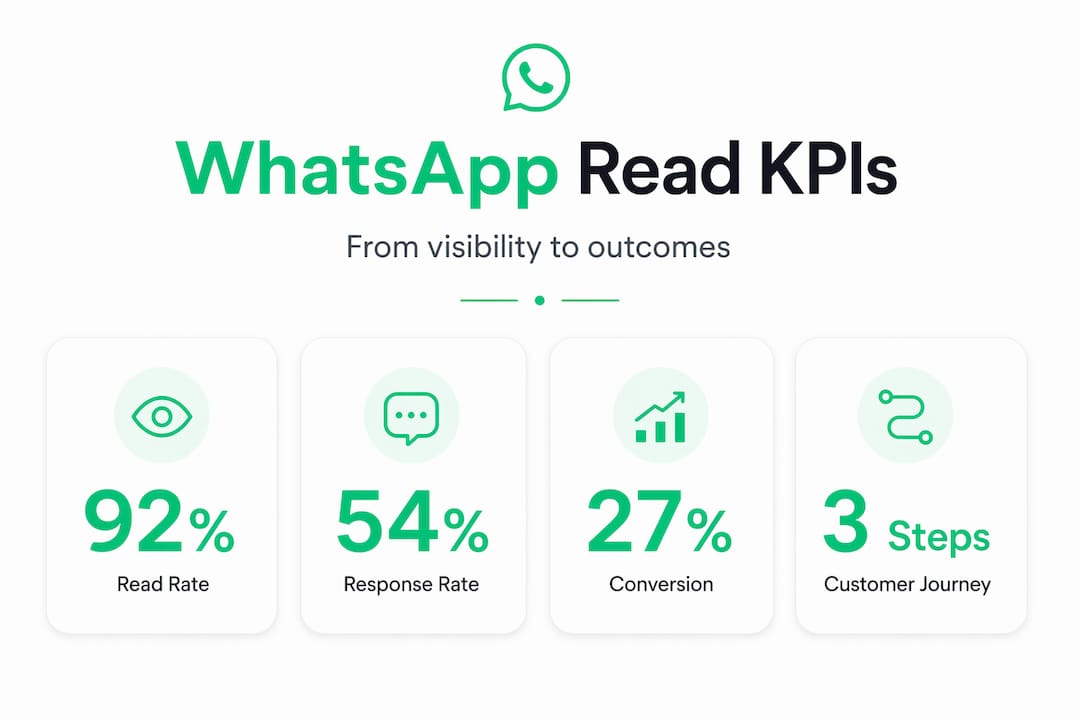
The full messaging funnel for WhatsApp looks like this:
| Metric | What it measures | Business signal |
|---|---|---|
| Delivery rate | Messages reaching devices | Infrastructure health |
| Read rate | Messages opened by recipients | Content visibility and timing |
| Response rate | Recipients who replied | Message relevance and CTA clarity |
| Conversion rate | Recipients who completed an action | Campaign effectiveness |
| Opt-out rate | Recipients who unsubscribed | Audience fit and frequency issues |
Each layer of this funnel answers a different question. Read rate answers “did they see it?” Response rate answers “did they care?” Conversion rate answers “did it work?” You need all three to diagnose what’s actually happening in your campaigns.
Practical metrics and their role in customer engagement:
- Read rate by message type: Compare read rates across promotional, transactional, and support messages to understand what your audience prioritizes.
- Time to read: How quickly a message is read after delivery signals urgency and relevance. A two-minute read time on an appointment reminder is very different from a 48-hour read time.
- Read-to-response gap: The time between the read event and a customer reply reveals friction in your call to action.
- Read rate by segment: Breaking read rates down by customer segment, region, or campaign type reveals which audiences are most engaged.
Implementation best practices: Avoiding common pitfalls
Understanding the theory is one thing. Getting read receipt automation to work reliably in production is another. There are several technical realities you need to design around from the start, not retrofit later.
The most common issue is out-of-order event delivery. WhatsApp’s webhook infrastructure does not guarantee that events arrive in the order they were generated. A “read” event can arrive at your server before the corresponding “delivered” event. If your workflow logic assumes sequential delivery, this breaks your state machine immediately.
The second issue is duplicate events. The same status update can be delivered more than once. This happens for legitimate technical reasons on WhatsApp’s infrastructure side. If your handler processes a “read” event twice, and your logic is not idempotent, you might fire two follow-up messages, log two analytics events, or create two support tickets.
Checklist for reliable read receipt integration:
- Store message state in a persistent database, not in memory or session variables.
- Use the message ID as the unique key for all state transitions.
- Apply timestamp comparison when processing events. If a “delivered” event arrives after a “read” event, update the delivered timestamp but do not roll back the state to “delivered.”
- Deduplicate events at the handler level using the message ID and event type as a composite key.
- Set explicit timeouts for each state. If no “read” event arrives within your defined window, the workflow should proceed on the “delivered” path.
- Log every event with its timestamp, even if you don’t act on it immediately. This gives you a complete audit trail for debugging.
- Test your handler explicitly with out-of-order and duplicate event sequences before going to production.
Pro Tip: Always design your state machine so that states can only move forward, never backward. A message that has been “read” should never revert to “delivered” regardless of the order events arrive.
A fresh perspective: Why read receipts are often misunderstood in business automation
The typical approach is to pull read rate into a reporting dashboard, compare it to last month’s number, and call it a metric. That’s passive. It treats a real-time event signal as a historical data point. The result is a team that knows their read rate went from 65% to 71% but has no idea what to do with that information.
The businesses that actually extract value from read receipts use them as triggers, not reports. They ask: “What should happen the moment a customer reads this message?” That question leads to fundamentally different system design. Instead of a reporting table, you get a workflow engine. Instead of a weekly analytics review, you get immediate, personalized follow-up.
Teams invest in read receipt tracking but don’t connect it to their state-machine logic. They know a message was read, but their automation still runs on a fixed time schedule. A follow-up fires 24 hours after sending regardless of whether the customer read the message at hour two. That’s not automation. That’s a timer.
The real shift happens when you treat every read event as a decision point. Did the customer read the message within the first hour? That’s a high-intent signal. Did they read it three days later? That’s a different signal, one that might warrant a completely different follow-up tone.
Frequently asked questions
How can businesses use WhatsApp read receipts to automate follow-ups?
Read receipt events can trigger automated reminders, escalations, and workflow transitions when a message is seen but not responded to. Read receipts are captured as status events (sent/delivered/read) to drive automation and reporting without polling.
Is read rate a reliable business KPI for WhatsApp messaging?
Read rate mainly shows message visibility, and for business impact, you should evaluate it alongside response rate and conversion metrics. Read receipts mainly tell you visibility, so pair them with response and conversion KPIs to connect messaging to real outcomes.
What implementation challenges exist with WhatsApp read receipts?
Common issues are event duplicates and out-of-order delivery, requiring idempotent and timestamp-driven workflow design. Webhook event ordering and duplicates mean state-machine-based workflows are essential for reliable read receipt handling.
Can Whatsable help track and use read receipts for automation?
Yes. Whatsable shows whether each message was sent, delivered or read in the inbox, and read rates for broadcasts and templates in Analytics. Smart broadcast pacing waits until enough of one batch has been read before sending the next. In Make, the "Get delivery status of a message" module returns a message's status, including read.

 Mira Okonkwo
 Elias Navarro
 Jonah Reed