 Whatsable







TL;DR:
- Most businesses mistakenly treat WhatsApp like email, assuming messages can be initiated arbitrarily; in reality, interactive messages can only be sent within 24 hours of a customer’s initial message. These structured, tappable messages—including buttons, lists, locations, and contact cards—enhance response speed, data accuracy, and customer satisfaction. To succeed, businesses must tailor their automation to the 24-hour window, ensuring timely, relevant interactions that respond to customer-initiated contact.
Most businesses assume WhatsApp works like email: you write a message, hit send, and the conversation begins on your terms. That assumption will get you nowhere on WhatsApp. A WhatsApp interactive message is a structured, button-enabled message that businesses can only send after a customer reaches out first, inside a strict 24-hour window. Getting that rule wrong means failed messages, broken automations, and frustrated customers. Get it right, and you have one of the most direct, high-response communication tools available to any business team today.
Table of Contents
- Understanding WhatsApp interactive messages and how they work
- The 24-hour conversation window: The critical rule for interactive messaging
- Best practices for implementing WhatsApp interactive messages in business workflows
- Advantages of WhatsApp interactive messages for enhancing customer engagement
- Common challenges and how to avoid pitfalls with WhatsApp interactive messaging
- A fresh look at WhatsApp interactive messages: Why timing and context trump volume
- Get started with WhatsApp interactive messaging automation
- Frequently asked questions
Key Takeaways
| Point | Details |
|---|---|
| Interactive message basics | WhatsApp interactive messages are enhanced message types like buttons and lists used within active conversations to boost engagement. |
| 24-hour window rule | Businesses can only send interactive messages during the 24-hour window after a user initiates contact to comply with WhatsApp policies. |
| Strategic workflow use | Effective automation sends interactive messages when users are receptive, with fallbacks to text to maintain smooth UX. |
| Engagement benefits | Using interactive messages speeds up communication, reduces friction, and increases customer satisfaction. |
| Avoid common pitfalls | Sending interactive messages outside allowed windows or without considering user context causes failures and poor experiences. |
Understanding WhatsApp interactive messages and how they work
A WhatsApp interactive message is not just a text with a question attached. It is a purpose-built message format designed for WhatsApp Business conversations that includes embedded UI elements, meaning buttons, lists, location cards, and contact cards, giving customers something to tap rather than type.
Think about the difference between sending a customer “Reply 1 for support, 2 for billing, 3 for sales” versus sending them a message with three clearly labeled tappable buttons. The second version removes ambiguity entirely. It also makes parsing responses in your automation far cleaner, because button replies carry structured data rather than free-form text.
As interactive WhatsApp message types include buttons, lists, location sharing, and contact cards, businesses have four distinct tools to enrich any conversation. Here is a quick breakdown of each:
- Interactive reply buttons: Up to three clickable buttons attached to a message. Best for binary or small-choice decisions. “Confirm appointment” / “Reschedule” / “Cancel” is a classic example.
- List messages: A menu of up to ten options presented as a structured list the user can scroll and tap. Ideal for product categories, support topics, or FAQ menus.
- Location messages: Allows businesses to share a precise map pin, or request the user’s location within the chat. Useful for delivery confirmations, store finders, and field service teams.
- Contact cards: Share a full contact entry, including name, phone number, and company, directly in the conversation thread. Valuable when handing off a customer to a specific team member or partner.
Each of these message formats allows quick user responses and richer information sharing compared to plain text. The real value is structural: every interactive element produces a consistent, machine-readable response that your automations can act on immediately.
The 24-hour conversation window: The critical rule for interactive messaging
Understanding the message types is just half the picture. The timing of when you can send interactive messages is critical and governed by WhatsApp’s 24-hour window.
Here is the rule in plain terms: the 24-hour window opens the moment a customer sends your business a message. During that window, you can send any combination of text and interactive messages freely. Once the window closes, you cannot send interactive messages without using an approved WhatsApp message template. There are no exceptions.
A business can’t initiate an interactive conversation and can only send interactive messages after the user has messaged and while the conversation window is active. This is not a platform quirk. It is a deliberate design choice by WhatsApp to protect users from unsolicited outreach.
This rule reshapes how you think about WhatsApp messaging strategy. You are not broadcasting. You are responding. The customer opens the door, you walk through it with your best interactive content, and you have 24 hours to close the loop.
The WhatsApp 24-hour messaging window also has a practical re-engagement implication: if a conversation goes cold, the only way to restart interactive messaging is to get the customer to message you again. That might mean sending an approved outbound template first, one that prompts a reply, and then using that reply to reopen the window and continue with interactive messages.

Pro Tip: Build your re-engagement templates with a clear call to action that invites a response. Even a simple “Reply YES to get your update” can reopen the 24-hour window and let your automation switch back into interactive mode.
Best practices for implementing WhatsApp interactive messages in business workflows
With the technical constraints clear, let’s explore how to use interactive messages within your automation workflows to maximize business value.
The most common mistake in production automations is sending interactive messages without checking whether an active conversation window exists. If your workflow fires a button message to a user who last messaged you 30 hours ago, the message fails silently or returns an error, depending on your platform. Always verify window state before sending.
Here is a practical workflow structure that avoids that problem:
- User sends a message to your WhatsApp Business number, triggering the 24-hour window.
- Your automation detects the incoming message and logs the timestamp to track window expiry.
- Send the first interactive message immediately, while the window is fresh and the user is actively engaged.
- Capture the structured button or list reply and branch your workflow based on the response.
- Continue the conversation with follow-up interactive messages or text as needed.
- If no reply arrives before the window closes, queue an approved template message to re-engage.
Production WhatsApp automation works best when you treat the 24-hour window as a session, not just a timer. Design your flow to complete a meaningful interaction inside that session, even if the user only taps one button.
Knowing which interactive format to use matters too. Here is a quick comparison:
| Scenario | Best message type | Why |
|---|---|---|
| Appointment confirmation | Reply buttons | Simple 2-3 option decision, fast to tap |
| Product category selection | List message | More than 3 options, browsable format |
| Service area confirmation | Location message | Visual, accurate, eliminates text errors |
| Handing off to a sales rep | Contact card | Delivers full contact details in one tap |
| Lead qualification survey | Reply buttons (sequenced) | Step-by-step, each answer branches next question |
Pro Tip: Combine chat widget engagement on your website with your WhatsApp automation. A visitor who taps “Chat on WhatsApp” from your site is a warm inbound contact who will message you first, naturally opening the 24-hour window the moment they connect.
For businesses building out WhatsApp lead conversion strategies, the sequenced button approach is particularly powerful. Each question in a qualification flow can be a separate interactive message, and each reply moves the lead further through your funnel without any human effort.
Advantages of WhatsApp interactive messages for enhancing customer engagement
Now that you know how to implement interactive messages, let’s review why they matter and the advantages they unlock for your business communication.
The benefits go beyond aesthetics. Interactive messages change the mechanics of how customers engage with your business:
- Faster response rates: Tapping a button takes two seconds. Typing a reply takes twenty. Removing that friction drives significantly higher response rates in automated flows.
- Cleaner data capture: Every button reply delivers a consistent, predictable string your automation can parse. Free-text replies require natural language processing. Buttons do not.
- Reduced drop-off: When customers face a wall of text asking them to reply with specific keywords, many disengage. A clear list or button menu keeps them moving through the flow.
- Higher satisfaction scores: Structured choices communicate respect for the customer’s time. It signals that your business anticipated their needs.
- Location and contact sharing: These two formats add a layer of richness that plain text simply cannot replicate. Sharing a precise delivery address or a direct contact entry inside a live chat is a genuinely better communication experience than copying information across channels.
Businesses using the WhatsApp automation benefits of interactive messaging also see internal gains. Support teams spend less time routing conversations manually when buttons pre-qualify the customer’s intent. Sales teams get structured lead data without relying on agents to ask the right questions every time.
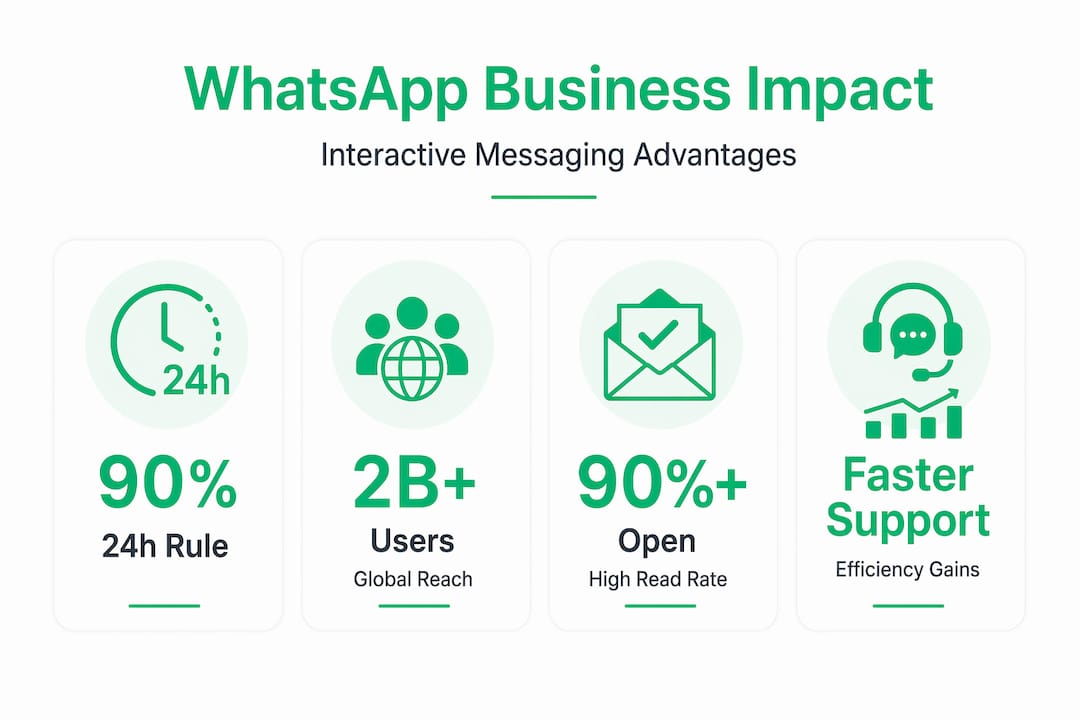
The data point worth noting: WhatsApp has over 2 billion active users globally, and open rates for WhatsApp messages consistently exceed 90%. Putting interactive buttons inside a channel with that kind of engagement is not incremental. It is a fundamental shift in how efficiently your team can convert a conversation into action.
Common challenges and how to avoid pitfalls with WhatsApp interactive messaging
Despite the benefits, using WhatsApp interactive messages improperly can cause setbacks. Here is what to watch out for and tips to avoid common mistakes.
The single biggest cause of interactive message failures is window expiry. Automations that queue up interactive messages on a delay, without checking the conversation state first, will fail regularly. Here is a checklist of the most common pitfalls:
- Sending outside the 24-hour window: Always verify the last inbound message timestamp before triggering any interactive message step in your workflow.
- Wrong context, wrong format: Sending a ten-option list message immediately after a user says “hello” creates confusion. Match the complexity of the interactive format to where the user is in the conversation.
- Missing fallback logic: Every interactive message step needs a fallback. If the window is closed or the message fails, your automation should immediately route to an approved template message rather than going silent.
- Untested flows: An interactive flow that works in a staging environment can behave differently in production, especially if your user base spans multiple devices and WhatsApp versions. Test across devices before going live.
- Ignoring read receipts: Automation troubleshooting often starts with read receipt data. If your interactive message was delivered but never read, the problem is timing or relevance, not technical failure.
Pro Tip: Build a “window health check” as the first step in every workflow branch that sends interactive messages. A simple conditional node that checks elapsed time since the last inbound message will save you hours of debugging failed message logs.
A fresh look at WhatsApp interactive messages: Why timing and context trump volume
Here is the uncomfortable truth about how most businesses approach WhatsApp messaging: they treat it like a broadcast channel and then wonder why engagement drops off.
The impulse makes sense. You have a list of contacts, a message ready to go, and a platform with 90-plus percent open rates. The temptation to blast outbound is real. But WhatsApp’s architecture actively resists that impulse, and for good reason. Businesses must wait for user initiation before engaging with interactive messages, and that constraint is not a bug. It is the feature.
What this forces, when you design around it rather than against it, is a fundamentally better communication model. Every interactive session starts because a customer chose to engage. That means they are already paying attention. That means your interactive message lands at the highest possible moment of relevance.
The businesses seeing the strongest results with WhatsApp interactive messaging are not sending the most messages. They are sending the right message inside an active conversation, at the moment a customer has just signaled intent. A user who messages to ask about pricing and immediately receives a structured list of your service tiers, with a button to book a call, will convert at a rate no cold outbound sequence can match.
State management matters enormously here. Your automation needs to know where each customer is in a conversation, what they have already answered, and what the logical next step is. Without that context, your interactive messages feel random rather than responsive. Investing in custom WhatsApp automation solutions that track conversation state properly is what separates teams that use interactive messaging as a genuine business tool from teams that use it as a gimmick.
Volume is easy to measure. Relevance is harder. But relevance is what fills pipelines.
Get started with WhatsApp interactive messaging automation
If this article has made one thing clear, it is that WhatsApp interactive messaging rewards businesses that invest in thoughtful automation rather than brute-force outreach.
The Whatsable platform is built specifically for that kind of automation. You can set up interactive message workflows, manage conversation state, and trigger button and list messages at the right moment inside active sessions, without writing a line of code. For agencies and larger teams, Whatsable whitelabel solutions let you deploy fully branded WhatsApp automation infrastructure for your clients or internal departments, with deep integrations into Zapier, Make, n8n, and Pipedrive already in place. Whether you are a sales team qualifying leads or a support team routing tickets, Whatsable gives you the tools to make every 24-hour window count.
Frequently asked questions
Can my business initiate a WhatsApp interactive message without the user messaging first?
No. WhatsApp requires user initiation first to open the 24-hour window before your business can send any interactive message. Outbound communication before that point requires approved message templates only.
What types of interactive messages can businesses send on WhatsApp?
Businesses can send interactive reply buttons, list messages, location messages, and contact cards to engage customers with structured, tappable responses rather than free text.
What happens if I send an interactive message outside the 24-hour customer service window?
The message will fail or be rejected by WhatsApp. Outside the 24-hour window, you must use an approved template message to re-engage the customer and reopen the conversation session.
How can businesses maximize customer engagement with WhatsApp interactive messages?
Time your interactive messages to fire immediately after a user sends their first message, use button and list formats that match the specific decision you are guiding, and design your automation to complete a full interaction inside the active session rather than stretching it across multiple days.
 Elias Navarro