 Whatsable






Yes, one business can run multiple WhatsApp numbers. The phone app breaks when you need more than a dual-account setup, or when managers need visibility across lines. The Cloud API path through Meta Business Manager supports many numbers, with each number verified separately.
Most ops teams hit this when sales and support need different numbers, or when branches need local presence. The real choice is whether to stay on phone apps or move to API-based tools that put those numbers in one workable view.
Can one business run multiple WhatsApp numbers, and when does the phone app break?
WhatsApp Business app on one phone typically supports up to 2 Business accounts through device dual-account. Beyond that, phone juggling breaks ops visibility.
You can install the app on multiple phones, each with its own number. That works for small teams where one person owns each line. It breaks when managers need to see conversations across numbers, when teammates need to cover more than one line, or when you want steady response times without checking several devices.
The phone app also lacks team features: no shared inbox, no assignment system, no manager oversight. Each number stays isolated on its device.
Meta Business Manager through Cloud API removes the device limit. You can register multiple numbers under one business. Each number still needs its own Meta verification. That path opens team tools and shared-inbox options through a BSP such as Whatsable.
App-level vs API-level: which job fits?
Phone app works when each number has one dedicated person and you do not need cross-line management. Sales owns the sales number, support owns the support number, the branch manager owns the branch number.
API-level fits when you need team coverage, manager visibility, or consistent response across multiple numbers. It also fits when you want templates, automation, or CRM handoff.
The transition usually hits when response times slip because the right person is offline, or when managers cannot see what is happening on different numbers.
| Approach | Fits when | Breaks when |
|---|---|---|
| Phone app (dual-account / multi-device) | One owner per number, no cross-line oversight | Managers need one view; coverage across lines; more than ~2 accounts on one phone |
| Cloud API / BSP (Whatsable) | Team access, templates, routing, multi-number ops | You only need one personal line with no shared inbox |
Phone app limits in practice:
- Device dual-account maximum around 2 Business accounts
- No shared team access
- No cross-number reporting
- No shared template workflow across lines
- Contact history stuck on each device
API-level benefits in practice:
- Multiple numbers under one Meta Business Manager
- Team access and label-based routing
- Manager oversight across connected numbers
- Template approval through Meta
- Integrations with tools you already run
How should sales vs support (or branches) split numbers?
Most businesses split by function or location. Sales gets one number, support gets another. Branches get local numbers for their regions.
The split should match how customers already think about your business. If they expect different contact points for different jobs, separate WhatsApp numbers help. If they expect one contact point, extra numbers can confuse them.
Common splits:
- Sales and support
- Geographic regions or branches
- Product lines or business units
- Languages or customer segments
Give each number a clear purpose and an owning team. Avoid overlap where customers message the wrong line and bounce around. Write the handoff: if someone starts in sales and later needs support, how do they know which number to use, and how does your team pass context without making them repeat the story?
Decide the architecture before you connect numbers. Renaming lines later is harder than getting the sales vs support split right on day one.
What does Whatsable Agency actually do for multiple numbers?
On Agency, Whatsable gives you a single shared inbox view across connected WhatsApp numbers. You can filter by number (All numbers, or one line) and by label. That filter is a UI convenience so the team can work without hopping accounts.
What Agency does not do: merge numbers into one contact pool, create a shared usage subscription across lines, or fold multi-number into one merged billing tier. Filtering the inbox is not the same as merged usage billing.
Pro vs Agency, in one line: Pro is one WhatsApp number plus a team inbox. Agency is multi-number; the shared filterable view is live. If you prefer fully separate logins per customer or brand, that remains an option.
Agency includes up to 100 connected phone numbers. Each additional connected phone number is $5. Contact billing still runs on unique-contact tiers (see pricing); do not read the inbox filter as a shared contact pool.
Setup connects each business number through Embedded Signup. Meta WhatsApp Coexistence lets you keep the WhatsApp Business app while connecting to Whatsable. Teammates can reply from the phone app or from Whatsable on the same thread when coexistence is on.
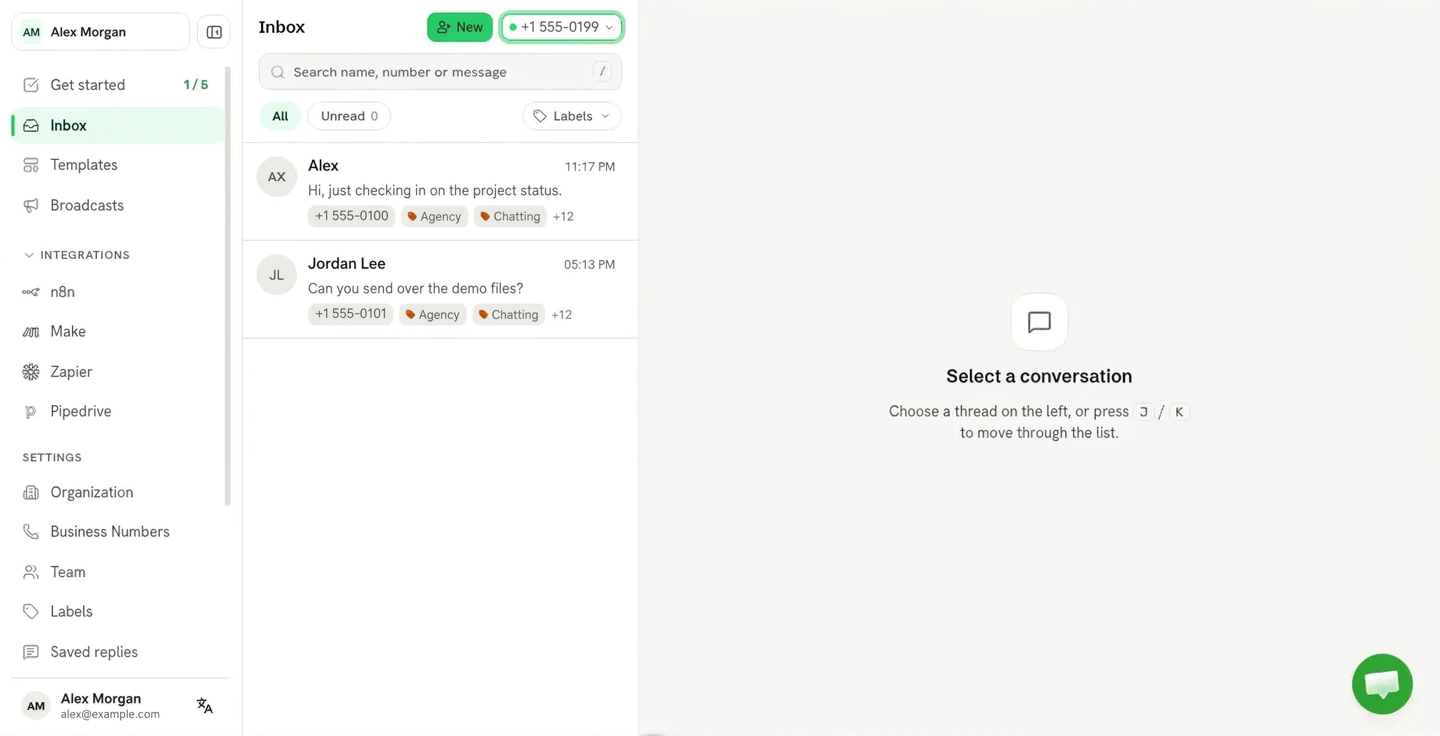
Whatsable Inbox: filter by connected number (dropdown) and Labels — Agency multi-number UI convenience. Not a merged contact pool.
How do teams avoid personal-number chaos?
Personal WhatsApp numbers mixed with business create compliance and handoff problems. When someone leaves, their personal number walks out with customer relationships.
Business numbers stay with the company. Teammates work those numbers through shared tools instead of private phones. That keeps the relationship under business control.
Pro path (one number): put the whole team on one business WhatsApp number with a shared 2-way inbox. Extra seats are $12/seat/mo. Routing happens with labels (and Zapier, Make, or AI where you use them). Assign chats to teammates with labels. A teammate limited to certain labels sees only the chats that carry them.
Agency path (multiple numbers): keep sales, support, or branch lines separate, then work them in the shared filterable inbox (All numbers / one line + labels), or keep per-customer logins when you need hard separation.
Set a clear policy: customer-facing chat goes on business numbers only. For customers who already saved a personal line, message them once, ask them to save the business number, and stop using the personal chat for new work. Document who can see which numbers, and set backup coverage so chats still get answered.
Setup path that matches Whatsable
- Embedded Signup with Coexistence. Connect through Meta’s Embedded Signup. Keep the WhatsApp Business app; do not uninstall it after connect. Coexistence is supported.
- Connect each business number. Each line needs Meta verification. Plan time for Meta’s review queue.
- Route. Open the inbox. Use the number filter (All numbers or one line) and labels so the right teammates see the right chats. Add seats if more people need the inbox.
- Templates. Approve message templates in Meta Business Manager before you need them for outbound.
- Test. Message each number from an outside phone. Confirm threads land correctly. Filter by number, apply a label handoff, and if coexistence is on, reply once from the phone app and once from Whatsable.
Coexistence can optionally import roughly the last 6 months of chat history from the Business app. That import can take hours. An empty-looking inbox right after connect is often the import still running.
Docs for the connect flow and inbox behavior: team inbox, embedding / Embedded Signup, and WhatsApp Coexistence. Plan gates and contact-tier dollars stay on whatsable.app/pricing (see also plans: Bulk Message, Pro, Agency).
What not to claim (honest limits)
| Topic | Honest limit |
|---|---|
| Phone dual-account | About 2 Business accounts max per device |
| Pro | One WhatsApp number + shared team inbox |
| Agency | Multi-number; shared inbox filterable by number and label (UI) |
| Contact / usage pool | No unified or merged contact pool across numbers; no shared usage subscription that merges billing tiers |
| Agency phone meter | Up to 100 connected numbers included; $5 each extra connected number |
| Meta verification | Meta-side rules for each number; not a Whatsable “unlimited numbers” promise |
| Bulk Message | Broadcasts only; no 2-way shared inbox; no multi-number |
Agency’s filterable shared view is real. That does not turn multi-number into one merged contact pool or one merged usage subscription. Point buyers to pricing for current contact-tier dollars.
Next step
If you need more than one WhatsApp number with a team inbox you can filter by line, look at Agency on whatsable.app/pricing, or start a trial and connect a second number in a quiet test window. A short demo works when you want to walk the All numbers / one-line filter against your sales vs support split.
FAQ
Can I run more than 2 WhatsApp Business accounts on one phone?
Device dual-account typically tops out around 2 Business accounts per phone. Past that you need more devices, or Cloud API through Meta Business Manager and a tool such as Whatsable.
How does Meta Business Manager handle multiple numbers?
You can register multiple WhatsApp numbers under one business. Each number needs its own verification. That removes the phone dual-account ceiling; team routing still needs an API-level inbox.
Does Agency merge contacts across different WhatsApp numbers?
No. Agency gives a shared inbox view you can filter by number and by label. It does not create a unified or merged contact pool, and it does not merge multi-number into one shared usage subscription.
What is the difference between Pro and Agency for multiple numbers?
Pro: one WhatsApp number plus a team inbox. Agency: multiple numbers, with a live shared filterable view (All numbers / one line + labels), up to 100 connected numbers included and $5 for each additional connected number. Fully separate logins per customer remain available when you want hard separation.
Can I keep the WhatsApp Business app with Whatsable?
Yes. Meta WhatsApp Coexistence lets you keep the phone app while connecting through Embedded Signup. Teams can reply from either place on the same 1:1 thread. Optional history import covers about the last 6 months and can take hours.
How do I route messages from different numbers to different teammates?
Use the Agency number filter plus labels. Show all numbers or one line, then label chats for the owning team. Seat access and label scope decide who sees what.
 Elias Navarro
 Jonah Reed