 Whatsable







TL;DR:
- WhatsApp list messages are interactive, structured menus that enable two-way responses, unlike traditional broadcasts. They require API access and explicit consent, serving specific functions like support routing and customer qualification. Building an ethical contact list and measuring engagement are essential for successful, compliant campaigns on this platform.
Most marketers who ask what is a WhatsApp list message assume it’s just another name for a broadcast blast. It isn’t. WhatsApp list messages are interactive, structured menus that let recipients tap a choice from a set of options you define, turning a one-way push into a two-way conversation. That distinction matters enormously for customer engagement, response rates, and staying on the right side of WhatsApp’s strict policies. This article breaks down exactly how list messages work, how to send them correctly, and how to build the kind of contact list that makes your campaigns perform.
Table of Contents
- Key takeaways
- What is a WhatsApp list message?
- How to send WhatsApp list messages
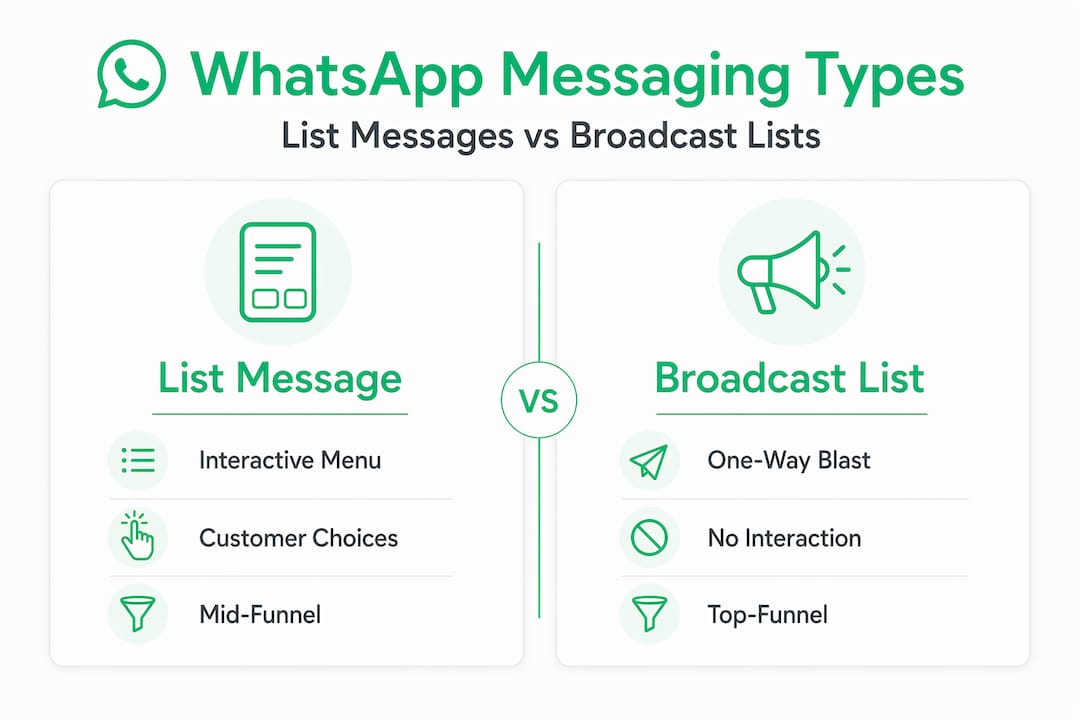
- WhatsApp list messages vs broadcast lists vs groups
- Building your WhatsApp contact list ethically
- Measuring and improving your campaigns
- My take on where most businesses get this wrong
- How Whatsable makes list messaging practical at scale
- FAQ
Key takeaways
| Point | Details |
|---|---|
| List messages are interactive | Unlike broadcasts, WhatsApp list messages present selectable menu options that drive customer responses. |
| API access is required | Sending list messages on WhatsApp requires the WhatsApp Business API, not just the standard app. |
| Consent is non-negotiable | Recipients must have saved your number and opted in, or your account risks an automated ban. |
| Broadcasts and lists serve different goals | Broadcast lists push one message to many; list messages collect structured input from individual users. |
| Analytics close the loop | Tracking option selections and response rates lets you continuously sharpen your messaging strategy. |
What is a WhatsApp list message?
A WhatsApp list message is an interactive message format available through the WhatsApp Business API. Instead of sending plain text and hoping for a reply, you present the recipient with a structured menu of up to 10 options organized into sections. The user taps a button to open the menu, selects their choice, and that selection is sent back as a reply you can act on automatically. Interactive list messages allow businesses to present customers with a menu of options they can quickly select from within the app, with each option defined as a row in the API request payload.
This is categorically different from a WhatsApp broadcast list. A broadcast pushes a single message outward to many recipients. A list message pulls a structured response back from one recipient at a time. Think of it as the difference between a flyer and a form.
Here is what the structure of a list message includes:
- Header (optional): A short title that frames the message, such as “How can we help you today?”
- Body text: Your main message, up to 4,096 characters
- Footer (optional): A brief note, often used for disclaimers or brand taglines
- Button label: The tap target that opens the menu, limited to 20 characters
- Sections and rows: The actual options grouped into up to 10 sections, each row carrying a title and optional description
WhatsApp list messages drive higher engagement because they reduce friction. Instead of asking a customer to type out their service preference, you hand them the choices. Response rates climb, support queues shorten, and the data you collect is clean and structured.
Pro Tip: Use the row descriptions inside your list to add context. A row labeled “Order status” with the description “Check where your package is right now” converts better than a bare label.

Practical use cases include customer support triage, appointment booking menus, product category selectors, feedback collection, and FAQ routing. Any scenario where you need the customer to choose a path benefits from this format.
How to send WhatsApp list messages
Sending list messages is not a tap-and-go process inside the regular WhatsApp app. List message formatting requires API support for menu creation and option handling, which means you need either direct API access or a platform that handles the API layer for you.
Here is the practical sequence for getting a list message campaign off the ground:
- Get access to the WhatsApp Business API. Apply through Meta’s developer portal or use a Business Solution Provider like Whatsable, which handles the setup and approval process.
- Build your message template. Define your header, body, footer, button label, and all section rows before sending. Map out the user journey first so every option leads somewhere useful.
- Set up your webhook or automation. When a recipient selects an option, your system needs to receive that selection and trigger the next step automatically.
- Segment your contact list. Send the right list message to the right audience. A customer who just purchased something needs a different menu than a cold lead.
- Test on your own number first. Check rendering, button behavior, and response handling before you go live.
- Launch and monitor. Watch delivery rates, open rates, and option selection data from the first send.
Compliance is not optional at any step. Businesses that message contacts without explicit opt-in risk automated account bans, and WhatsApp’s detection systems are sophisticated enough to flag patterns quickly. Every contact in your send list must have saved your number and explicitly agreed to receive messages from you.
Pro Tip: Keep your list message button label action-oriented. “Choose an option” underperforms compared to “Pick your service” or “Select a topic.” Small copy decisions have measurable effects on tap rates.
For teams managing multiple campaigns across different segments, tools like Whatsable’s WhatsApp automation platform handle the API complexity, response routing, and contact management in one place, cutting the technical overhead significantly.
WhatsApp list messages vs broadcast lists vs groups
Choosing the wrong format for your goal wastes budget and frustrates customers. Here is a direct comparison across the three primary communication types:
| Feature | List messages | Broadcast lists | WhatsApp groups |
|---|---|---|---|
| Recipient interaction | Selects from menu options | Read-only, no structured reply | Multi-way conversation |
| Delivery requirement | API, opt-in contact | Recipient must have saved your number | Anyone added by admin |
| Privacy | One-to-one per recipient | Private replies back to sender | All members see all messages |
| Scale | One user at a time, automated | Up to 256 contacts per list | Up to 1,024 members |
| Best use case | Support routing, guided sales | Announcements, promotions | Community, team discussions |
| Replies | Structured, automated-ready | Replies arrive as private chats | Visible to the whole group |
The core insight here is that each format solves a different problem. Broadcast lists are efficient for pushing information to an existing audience, but they offer no structured mechanism for collecting a response. Groups create community but sacrifice privacy and control. List messages are purpose-built for guided interaction, making them the right choice when you need customers to self-select into a service path, a support category, or a product tier.
For marketing specifically, list messages work best mid-funnel. Once a lead has shown interest, a list message menu helps qualify them without requiring a human agent in the loop.
Building your WhatsApp contact list ethically
The most expensive mistake in WhatsApp marketing is a good-looking contact list that gets your account banned on the first send. WhatsApp’s automated spam detection flags repeated messages to unsaved contacts quickly, and recovery from a ban is painful and uncertain.
Building the right list means starting from permission, not from a spreadsheet someone sold you. Permission-based audiences consistently outperform purchased lists in both engagement and compliance. Here is what ethical, effective list building looks like in practice:
- Use opt-in forms on your website and landing pages. Include a clear checkbox that confirms the user agrees to receive WhatsApp messages, separate from email consent.
- Add a WhatsApp opt-in step in your checkout or onboarding flow. Customers who just bought from you are the highest-intent audience you have.
- Run click-to-WhatsApp ads on Meta. These drive traffic directly into a WhatsApp conversation, creating an organic, consented contact.
- Promote your WhatsApp number in email campaigns. Ask existing subscribers to opt in for faster, more personal communication on WhatsApp. Pairing this with solid list growth strategies across channels compounds your results.
- Segment from day one. Tag contacts by source, interest, or purchase history so your list messages are relevant to each segment, not generic to all.
- Audit and clean your list regularly. Unengaged contacts who have not interacted in 90 days pull down your metrics and increase your spam risk.
There is also a legal dimension. Depending on your region, collecting and storing WhatsApp numbers for marketing may fall under GDPR, CCPA, or local data protection laws. Your opt-in process must document consent, and your contacts must be able to unsubscribe easily.
Measuring and improving your campaigns
You cannot improve what you do not measure. WhatsApp list messages generate more trackable data than standard text messages because each recipient’s selection is a discrete data point tied to their contact record.
The metrics that matter most are delivery rate, open rate, menu open rate (how many recipients actually tapped the button), selection distribution (which options were chosen and how often), and downstream conversion rate (what happened after the selection). Together these tell you whether your message is reaching people, whether the offer is compelling enough to open, and whether your menu options match what customers actually want.
Tools like Whatsable provide dashboards that surface these metrics in real time, which makes it practical to run A/B tests on button labels, body copy, or menu structure without waiting days for results. WhatsApp read receipts and engagement signals feed directly into automation triggers, so a contact who opens but does not select can automatically receive a follow-up message 24 hours later.
Personalization is the other lever. Use the data from previous interactions to pre-select relevant sections or tailor the menu body to what that specific customer segment cares about. A customer who previously selected “Billing support” should not receive the same menu as a first-time visitor still in the awareness phase. Pair this thinking with a structured marketing automation approach to build sequences that respond to behavior rather than just time.
Stay aware of WhatsApp’s 24-hour messaging window. Outside of this window, you must use pre-approved message templates, which have their own formatting constraints. Plan your follow-up cadence around this rule to avoid delivery failures.
My take on where most businesses get this wrong
I’ve watched marketing teams invest real budget in WhatsApp campaigns and then wonder why their accounts get flagged or their engagement numbers look flat. In my experience, the problem almost never comes down to the message itself. It comes down to the contact list.
Most businesses treat WhatsApp like they treat email, dropping contacts in from whatever source is available and assuming that reach equals results. WhatsApp operates on a completely different social contract. Your recipients have given you access to their most personal communication channel. If your message feels irrelevant or uninvited, they do not unsubscribe. They report you. And WhatsApp’s systems notice.
What I’ve found actually works is treating every contact on your WhatsApp list as someone who specifically requested to hear from you on that channel. That mindset change forces you to clean your opt-in process, tighten your segmentation, and write messages that are worth the interruption. The businesses I’ve seen get the best results are not the ones sending the most messages. They are the ones sending the right message to the right person with a clear reason for that person to respond.
List messages specifically reward this discipline. When your menu options map directly to what your segment actually needs, selection rates go up and support escalations go down. That combination is where the real ROI lives.
— Axel
How Whatsable makes list messaging practical at scale
Setting up WhatsApp list messages from scratch requires API access, webhook management, contact segmentation, and compliance monitoring. For most marketing teams, that is a significant technical lift. Whatsable handles the infrastructure so your team can focus on strategy and copy rather than API payloads. You get bulk messaging with built-in anti-block measures, automated follow-up sequences, detailed engagement analytics, and integrations with Zapier, Make, n8n, and Pipedrive out of the box. Whether you are running customer support triage, lead qualification flows, or promotional campaigns, Whatsable gives you the tools to build, test, and scale list message campaigns without needing a developer on standby. If you need branded solutions for client campaigns, the white-label option lets you deliver everything under your own brand.
FAQ
What is a WhatsApp list message exactly?
A WhatsApp list message is an interactive message sent through the WhatsApp Business API that presents the recipient with a structured menu of up to 10 selectable options. It is designed to collect a specific response rather than invite a free-text reply.
How is a list message different from a broadcast list?
A broadcast list sends a single message to up to 256 contacts simultaneously, but recipients cannot interact with a structured menu. A list message is sent individually and collects a specific selection from each recipient through an interactive interface.
Do I need the WhatsApp Business API to send list messages?
Yes. List messages are not available in the standard WhatsApp or WhatsApp Business app. You need API access, either directly through Meta or via a platform like Whatsable that manages the integration for you.
Can my account get banned for sending WhatsApp list messages?
Yes, if you send messages to contacts who have not saved your number or given explicit consent. Millions of accounts are banned monthly for spam-related violations, making opt-in contact management non-negotiable.
How many options can I include in a WhatsApp list message?
You can include up to 10 rows (options) across up to 10 sections in a single WhatsApp list message. Each row can have a title and an optional short description to help recipients make the right choice.
 Elias Navarro