 Whatsable







TL;DR:
- Effective WhatsApp escalation involves seamless handoffs that transfer full context and maintain conversation threads to prevent customer frustration.
- Proper integration with CRMs and accurate trigger definitions are essential for automating routine inquiries and escalating complex issues efficiently.
When a customer sends an angry message and your bot keeps answering in circles, you have already lost that interaction. Customer escalation via WhatsApp explained properly is not just a technical topic. It is the difference between a resolved complaint and a scathing review. WhatsApp now handles more than two billion users globally, and businesses that treat escalation as an afterthought pay for it in churn. This guide breaks down how escalation works, what separates smooth handoffs from frustrating ones, and what your team needs to do to get it right.
Table of Contents
- Key Takeaways
- Customer escalation via WhatsApp explained: the fundamentals
- How seamless escalation improves the customer experience
- Automation vs. human intervention: what the numbers say
- Integrating WhatsApp escalations into your CRM
- Your WhatsApp escalation implementation checklist
- My take on why most teams get this wrong
- How Whatsable makes WhatsApp escalation work for your business
- FAQ
Key Takeaways
| Point | Details |
|---|---|
| Escalation is a workflow, not a fallback | Define clear triggers so your AI hands off to humans before frustration builds. |
| Context transfer is non-negotiable | Pass full conversation history and metadata to agents so customers never repeat themselves. |
| 88% of inquiries can be automated | Reserve human agents for complaints, refunds, and emotionally charged situations. |
| WhatsApp needs CRM integration | Treat WhatsApp as core infrastructure by connecting it to platforms like Salesforce or GoHighLevel. |
| Invisible handoffs build trust | Customers should never notice the switch from bot to agent within the same thread. |
Customer escalation via WhatsApp explained: the fundamentals
Escalation in WhatsApp customer service means routing a conversation from an automated system, or a lower-tier agent, to a more qualified human agent when the current responder cannot resolve the issue. It sounds simple. In practice, it involves a chain of decisions, triggers, and technical events happening in seconds.
The most common escalation triggers you will encounter include:
- Repeated failed responses from the bot across two or more turns
- Keywords signaling frustration such as “refund,” “cancel,” “this is ridiculous,” or “speak to someone”
- Request type complexity where the issue involves account disputes, technical faults, or legal concerns
- Emotional tone detection where sentiment analysis flags distress or anger
- Explicit customer request to talk to a human agent
The critical distinction to understand is the difference between AI resolution and human handoff. AI resolution means the bot handles the full interaction from start to finish. Human handoff, also called a human escalation, means the conversation is transferred to a live agent. The entire escalation process on WhatsApp lives in the space between those two outcomes.
Conversation continuity is the term that matters most here. The customer should stay in the same WhatsApp thread throughout. They should never be asked to call a number, open a ticket in a separate system, or start a new chat. The thread is the relationship.
Pro Tip: Define your escalation triggers in writing before you configure a single chatbot response. Most support failures happen because the rules were never clearly set.
How seamless escalation improves the customer experience
The moment a customer notices the seam between your bot and your agent, you have already created friction. Invisible handoffs in the same thread increase customer satisfaction and reduce abandonment. That is not opinion. It is what the data shows when comparing switched-channel escalations to in-thread ones.
The technical side of a smooth escalation depends on four things working together.
Full context transfer is the most underestimated requirement. When an agent receives an escalated chat, they need the full conversation history, not just the last message. Passing conversation history and metadata during handoff is what prevents the infuriating “can you explain the issue again?” moment that tanks customer trust.

Confidence-based and intent-based triggers work together as your early warning system. A confidence-based trigger fires when the AI scores its own response below a set threshold, say 80% certainty. An intent-based trigger fires when it detects specific request types regardless of confidence. Using both trigger types together catches escalations before the customer gets frustrated rather than after.
Message queue architecture is a technical reality you cannot ignore. WhatsApp delivers messages asynchronously, and under peak load that creates ordering problems and potential message loss. Queue systems like BullMQ or Redis prevent messages from arriving out of sequence or disappearing during a handoff.
Response time expectations are tighter than most teams assume. WhatsApp response times under 10 minutes during business hours are what customers now expect. Even if a human agent is not immediately available, an automated acknowledgment that the issue has been received and a human is reviewing it does real work to reduce anxiety.
Pro Tip: Build your human handoff architecture from day one, even if you launch with full automation. Retrofitting escalation paths into an existing bot is significantly harder than designing them in from the start.
Automation vs. human intervention: what the numbers say
Here is where many support teams get the balance wrong. They either automate everything and lose the human moments that matter, or they escalate too aggressively and overload their agents with routine inquiries.
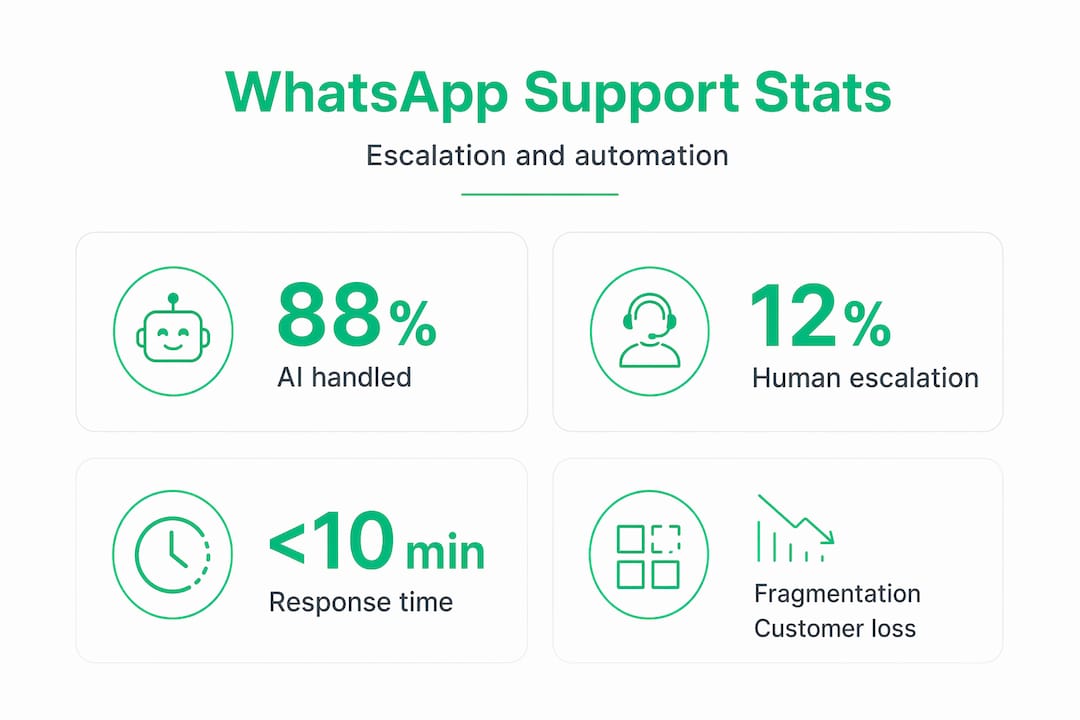
The data points to a clear operational target. About 88% of standard inquiries in AI-managed WhatsApp workflows are handled fully by automation, with roughly 12% flagged for human review. That ratio gives you a useful benchmark when planning staffing and capacity.
| Inquiry type | Best handled by | Why |
|---|---|---|
| FAQs, store hours, pricing | AI automation | Structured, predictable, no emotional component |
| Order status, tracking updates | AI automation | Data retrieval with no judgment required |
| Refund requests, billing disputes | Human agent | Requires policy interpretation and empathy |
| Complaints and emotional situations | Human agent | Emotional situations require human touch beyond AI capability |
| Complex technical faults | Human agent | Multi-step diagnosis needs contextual judgment |
| Account security concerns | Human agent | Risk and trust are too high for automation |
Over-automating creates its own damage. When customers with legitimate complaints keep hitting bot loops, the frustration compounds. Under-automating wastes agent capacity on questions your bot could answer in four seconds. Your job is to calibrate the threshold and monitor it continuously.
Pro Tip: Review your escalation rate every two weeks for the first three months after launching a WhatsApp support workflow. A rate significantly above 20% usually signals that your bot’s intent recognition needs work. A rate below 5% might mean you are under-escalating and masking unresolved frustrations.
Tracking chatbot-to-human handoff performance over time is the only reliable way to know whether your thresholds are set correctly. Gut feeling is not enough here.
Integrating WhatsApp escalations into your CRM
The single biggest structural mistake businesses make with WhatsApp customer service escalation is treating WhatsApp as a standalone messaging channel. It is not. WhatsApp is becoming foundational business infrastructure, and it needs to be wired into your CRM the same way email or phone are.
When WhatsApp conversations live in a separate silo, agents receive escalated chats with no customer history, no previous ticket context, and no purchase data. They are starting blind every single time. Integrating WhatsApp into CRMs like Salesforce or GoHighLevel solves this by creating a unified customer record that agents can access the moment a chat lands in their queue.
Practical steps for making this integration work effectively:
- Map conversation metadata to CRM fields so that escalation flags, sentiment scores, and topic categories populate automatically
- Set up escalation tagging so agents immediately see why a conversation was escalated, not just that it was
- Link WhatsApp contact IDs to existing customer profiles to surface order history, past support tickets, and account status
- Configure real-time alerts so agents know immediately when a high-priority escalation arrives rather than polling a queue
AI-powered CRM integration takes this further by surfacing recommended responses and customer risk scores the moment an escalation opens. That kind of context shortens resolution time measurably.
When selecting tools, prioritize platforms that support bidirectional sync, meaning updates made in the CRM reflect back in the WhatsApp interface for the agent and vice versa. One-way integrations create data gaps that compound over time.
Your WhatsApp escalation implementation checklist
Getting this right requires more than good intentions. Here is a practical sequence for teams building or overhauling their WhatsApp escalation procedure.
-
Define your escalation triggers explicitly. Write out every keyword, sentiment signal, intent category, and confidence threshold that will fire an escalation. Document it in a shared spec before touching any configuration.
-
Build your AI chatbot with dual triggers. Configure both confidence-based thresholds and intent-based detection. Neither works as well alone as they do together.
-
Design the handoff to stay in-thread. The customer should see a brief message like “I am connecting you with a team member now” and nothing else changes from their perspective. No links to new chats, no instructions to call.
-
Set up your message queue infrastructure. If you are using the WhatsApp Business API directly, implement a queuing layer. If you are using a platform, verify that it handles message ordering and delivery guarantees during peak load.
-
Connect WhatsApp to your CRM before you go live. Not as a future phase. Before launch. Agents need customer context from the first escalation.
-
Train your support team on escalated chat dynamics. WhatsApp conversations have a different rhythm than phone calls or email. Agents need to respond faster, write more concisely, and signal empathy quickly in text.
-
Monitor escalation rate, resolution time, and CSAT weekly. Set baseline targets in your first month and adjust thresholds based on real data.
Pro Tip: Run a “mystery shopper” test on your own WhatsApp escalation flow every quarter. Have someone outside your team trigger an escalation and document the full experience from the customer side. You will find gaps that never show up in internal metrics.
My take on why most teams get this wrong
I have seen support teams spend months perfecting their chatbot responses and then build the escalation path in two days as an afterthought. It almost always backfires. In my experience, the escalation moment is the highest-stakes touchpoint in any support interaction. Getting the routine questions right is table stakes. How you handle the hard moments is what customers actually remember.
The most consistent failure I have seen is incomplete context transfer. A customer spends ten minutes explaining a billing issue to a bot, gets escalated, and then the human agent opens with “Can you describe your issue?” That single experience does more damage than five unresolved bot conversations. The technical fix is not complicated. Passing the full conversation log with intent flags is a solvable engineering problem. The real issue is that teams do not prioritize it until they see the CSAT scores.
My other observation is that businesses underestimate how much the tone of the handoff message matters. “Transferring you now” feels cold and automated. “Let me get someone on your team who can help with this directly” feels like a person who cares. The words you use in that two-second transition carry more weight than you might expect.
The teams that get WhatsApp escalation right treat it as a designed customer experience, not a technical fallback. Every trigger, every handoff message, every agent workflow is intentional. That level of care is what separates a 4.8-star support rating from a 3.2.
— Axel
How Whatsable makes WhatsApp escalation work for your business
If everything above resonates and you are now looking at your current WhatsApp setup wondering where the gaps are, Whatsable was built for exactly this situation.
Whatsable’s platform combines AI-powered automation with structured human handoff workflows, so your team gets the efficiency of automation without sacrificing the quality of human support when it counts. Whatsable integrates directly with tools like Zapier, Make, and Pipedrive, which means your WhatsApp escalation data flows into the systems your agents already use. No more switching between disconnected tools or reconstructing context from scratch.
Whether you are building your first WhatsApp support workflow or replacing a fragmented setup that is costing you customers, explore what Whatsable offers and see how the platform handles escalation at every tier. If your agency manages multiple clients, the whitelabel solution gives you full control over branded escalation workflows at scale.
FAQ
What is customer escalation via WhatsApp?
Customer escalation via WhatsApp is the process of routing a support conversation from an AI chatbot or lower-tier agent to a qualified human agent when the issue exceeds automation capabilities. The goal is to resolve the customer’s issue without interrupting the conversation thread.
When should a WhatsApp chatbot escalate to a human?
A chatbot should escalate when it detects emotional distress, a request involving refunds or complaints, a drop below its confidence threshold, or an explicit request for a human agent. Complaints and emotional situations are the clearest triggers for human handoff.
How do you escalate issues on WhatsApp without frustrating the customer?
Keep the conversation in the same thread, send a brief and warm transition message, and pass the full conversation history to the human agent. Customers who do not have to repeat themselves are significantly less likely to abandon the interaction.
What is a good escalation rate for WhatsApp AI support?
A well-calibrated system targets around 12% of conversations escalated to human agents. Rates significantly higher suggest the bot needs better intent training. Rates significantly lower may indicate the system is suppressing legitimate escalations.
Why is CRM integration important for WhatsApp escalation?
CRM integration gives human agents immediate access to customer history, past tickets, and account data the moment an escalation arrives. Without it, fragmented customer histories force agents to start cold, which slows resolution and frustrates customers.

 Mira Okonkwo
 Jonah Reed