 Whatsable







TL;DR:
- A WhatsApp session message is a free-form reply sent within a 24-hour customer-initiated support window. The window resets with each new customer message, allowing unlimited real-time exchanges during active conversations. When the session expires, businesses must use pre-approved template messages to re-engage customers.
A WhatsApp session message is a free-form message a business sends to a customer within a 24-hour customer service window that opens after the customer initiates contact. No pre-approval is required, unlike template messages. This makes session messages the most flexible tool in the WhatsApp Business API for real-time customer support and sales conversations. Platforms like Salesforce Marketing Cloud and businesses using the WhatsApp Business API rely on this window to handle everything from order updates to live troubleshooting. This guide covers how the session window works, what you can send, how session messages compare to templates, and how to use them well.
What is a WhatsApp session message and how does it work?
A WhatsApp session message is defined as any free-form message sent by a business during an active 24-hour customer service window. That window opens the moment a customer sends your business a message. From that point, you can reply with text, images, documents, or interactive content without submitting anything for review.

The session window is not fixed at a single 24-hour block. Each new customer message resets the timer, which means an active conversation can stay open indefinitely as long as the customer keeps responding. A customer who messages you on Monday morning, then again Monday evening, effectively gives you a fresh 24-hour window each time.
Once the window expires, the rules change. You can no longer send free-form content. You must use a pre-approved template message to re-engage the customer. Template messages are structured, reviewed by Meta, and designed for outbound contact outside the session.
This two-track system exists because WhatsApp wants to prevent businesses from spamming users. Session messages are only possible because the customer started the conversation. That consent is the foundation of the entire model.
Pro Tip: Set up an internal alert or CRM trigger that flags conversations approaching the 24-hour mark. A timely follow-up message from your team keeps the session alive and avoids the need to send a template.
How does the 24-hour session window reset?
The session window resets dynamically. Every time a customer sends a message to your business number, the clock restarts from zero. This means a conversation that started three days ago is still “in session” if the customer replied an hour ago.
Here is what happens at each stage:
- Customer sends first message: The 24-hour window opens. You can now send any type of content freely.
- Customer replies again: The window resets. You get another full 24 hours from that reply.
- No customer reply for 24 hours: The session expires. You must use a pre-approved template to contact them again.
- Customer replies to your template: A new session window opens from that reply.
Unlimited free-form messages are allowed within the active window at no extra per-message cost. That is a significant operational advantage for support teams handling complex issues that require back-and-forth exchanges.
Since february 2022, WhatsApp charges per conversation rather than per individual message. One conversation covers the entire 24-hour session. This pricing model rewards businesses that keep customers engaged because more messages within a single session cost nothing extra.
What can you send in a WhatsApp session message?
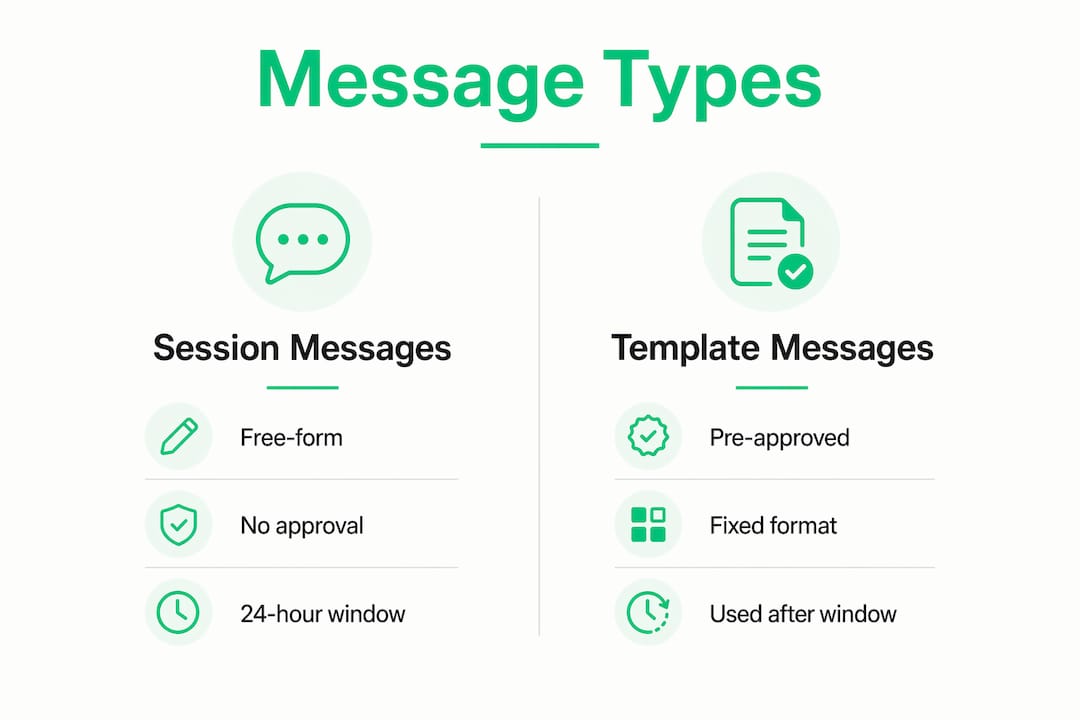
Session messages support a wide range of content types. This flexibility is what separates them from template messages, which follow a rigid, pre-approved structure.
You can send any of the following during an active session:
- Text messages: Plain replies, answers to questions, or detailed explanations
- Images and videos: Product photos, how-to clips, or visual troubleshooting guides
- Voice notes: Useful for complex instructions or a more personal customer touch
- Documents: PDFs, invoices, shipping labels, or contracts
- Interactive elements: Buttons, quick replies, and list messages that guide the customer toward a next step
This flexibility enables natural, conversational engagement that feels nothing like a scripted chatbot. A customer asking about a delayed order can receive a tracking document, a video update, and a quick-reply button to confirm receipt, all within one session.
Template messages cannot do this. They follow a fixed format approved by Meta in advance. You cannot add a spontaneous image or change the wording on the fly. Session messages give your team the freedom to respond like a human, not a form letter.
Pro Tip: Use interactive buttons during a session to guide customers toward self-service options like “Track my order” or “Speak to an agent.” This keeps the conversation moving and reduces the chance the session expires before the issue is resolved.
Strong business communication depends on meeting customers where they are, and session messages make that possible on one of the world’s most-used messaging platforms.
WhatsApp session messages vs. template messages: key differences
Understanding session messages means understanding what they are not. Template messages are the other half of the WhatsApp Business API messaging model, and the two serve very different purposes.
| Attribute | Session messages | Template messages |
|---|---|---|
| Approval required | No | Yes, Meta review required |
| Who initiates | Customer must message first | Business can initiate |
| Timing | Within 24-hour window only | Outside or inside session |
| Content type | Free-form, any format | Structured, pre-approved format |
| Cost model | Included in conversation charge | Included in conversation charge |
| Use case | Live support, sales conversations | Notifications, reminders, re-engagement |
The most important distinction is timing. Session messages only exist because a customer reached out first. Template messages exist so businesses can reach customers who have not messaged recently, such as sending a shipping notification or a payment reminder.
Experts recommend using the session window to deepen customer relationships through conversational engagement rather than treating every reply as a transactional exchange. A customer who feels heard during a live session is far more likely to respond to a template message later.
The cost model matters here too. Since WhatsApp moved to per-conversation pricing, the financial incentive is to maximize value within each session. Sending ten helpful messages in one session costs the same as sending one. That changes how smart teams approach support workflows.
Best practices for using WhatsApp session messages effectively
Getting the most from session messages requires more than just replying quickly. Here are five practices that make a measurable difference.
-
Respond within the first hour. Studies show 67% of customers expect a response within one hour on messaging platforms. A fast first reply signals reliability and keeps the session active from the start.
-
Encourage the customer to keep the conversation going. Ask a follow-up question or offer a next step that prompts a reply. Each customer response resets the 24-hour window, giving your team more time to resolve the issue without switching to templates.
-
Use rich media to personalize the exchange. Send a product image instead of describing it in text. Share a short video walkthrough instead of a bulleted list. Rich content reduces back-and-forth and resolves issues faster.
-
Monitor session activity in your CRM or messaging platform. Know which conversations are approaching expiration. A proactive message before the window closes is far better than scrambling to get a template approved after it expires.
-
Separate session messages from device session security. WhatsApp device sessions refer to linked devices in WhatsApp Web or Desktop, not the customer service window. Confusing the two leads to security mismanagement. Monitor linked devices regularly and disconnect any you do not recognize to protect customer data.
Businesses using conversational lead capture strategies find that session messages are one of the highest-converting touchpoints in the customer journey. The combination of real-time context, rich content, and no approval friction makes them hard to beat.
Key takeaways
A WhatsApp session message is the most flexible and cost-efficient message type in the WhatsApp Business API, available only within the 24-hour window a customer opens by messaging first.
| Point | Details |
|---|---|
| Core definition | A session message is a free-form business reply sent within a 24-hour customer-initiated window. |
| Window resets dynamically | Every new customer message restarts the 24-hour clock, extending the session indefinitely. |
| Rich content allowed | Text, images, videos, voice notes, documents, and interactive buttons are all permitted. |
| No extra cost per message | WhatsApp charges per conversation, so unlimited session messages cost the same as one. |
| Templates fill the gap | When the session expires, pre-approved template messages are the only way to re-engage. |
Why the session window is more strategic than most businesses realize
Most teams treat the 24-hour window as a deadline to beat. I think that framing misses the bigger opportunity. The session window is not a countdown. It is an invitation to have a real conversation.
The businesses I have seen get the most out of WhatsApp messaging are the ones that treat every session like a live call. They ask questions. They send relevant content. They close loops before the customer has to ask twice. The 24-hour limit stops being a pressure point when your team is genuinely engaged.
One thing I want to flag clearly: the terminology around “WhatsApp sessions” creates real confusion. A WhatsApp device session is a security concept tied to linked devices on WhatsApp Web. A customer service session is a messaging window. These are completely different things. Mixing them up leads to either security gaps or policy mistakes, and I have seen both happen to otherwise well-run teams.
The shift to per-conversation pricing since february 2022 also changed the math in ways many businesses have not fully absorbed. You are no longer penalized for sending more messages within a session. That should change how you staff support, how you structure follow-ups, and how you think about resolution time.
The WAPIx multi-session API server built on Node.js is a good example of where the infrastructure is heading. Businesses managing multiple WhatsApp numbers programmatically need session persistence, QR code handling, and chat retrieval at scale. The technology is there. Most teams just have not caught up to it yet.
— Axel
How Whatsable helps you manage WhatsApp session messages at scale
Managing session windows across dozens of customer conversations is where manual processes break down fast. Whatsable is built to handle exactly that.
Whatsable lets businesses automate follow-up sequences, manage multiple WhatsApp accounts, and integrate with tools like Zapier, Make, n8n, and Pipedrive so your CRM always knows where each session stands. The Whatsable Bot handles internal team alerts so your agents get notified before a session window expires. No more missed windows, no more scrambling for template approvals. Visit Whatsable to see how it fits your workflow, or explore the white-label option if you need branded messaging at scale.
FAQ
What is a WhatsApp session message?
A WhatsApp session message is a free-form message a business sends within a 24-hour customer service window that opens after a customer initiates contact. No pre-approval from Meta is required during this window.
How long does a WhatsApp session last?
The session lasts 24 hours from the customer’s last message. Each new message from the customer resets the timer, so an active conversation can extend the session indefinitely.
What happens when a WhatsApp session expires?
When the 24-hour window closes, businesses can no longer send free-form messages. They must use a pre-approved template message to re-engage the customer and reopen a session.
Are WhatsApp session messages free?
WhatsApp charges per conversation, not per message. All messages sent within a single 24-hour session are covered under one conversation charge, making session messages cost-efficient for extended support exchanges.
What is the difference between a session message and a device session on WhatsApp?
A session message refers to the 24-hour customer service window in the WhatsApp Business API. A device session refers to a linked device in WhatsApp Web or Desktop and is a security feature, not a messaging concept.

 Elias Navarro
 Mira Okonkwo