 Whatsable







TL;DR:
- Business messaging automation delivers timely, personalized messages triggered by customer actions without manual effort. It scales communication across multiple channels, improving efficiency and customer engagement. Effective implementation requires strategic focus on high-impact workflows, proper compliance, and seamless tool integration.
Most businesses treat messaging automation as either a luxury they can’t afford to figure out or a shortcut that produces robotic, forgettable messages. Neither view is accurate. Understanding what is business messaging automation means recognizing it as the deliberate, trigger-based practice of sending the right message to the right person at exactly the right moment, without a human pressing “send” every time. Done well, it scales personalized communication without sacrificing relevance. This guide walks you through how it works, what you gain from it, which tools deserve your attention, and how to implement it without the common missteps.
Table of Contents
- Key Takeaways
- What business messaging automation actually is
- The real business impact of messaging automation
- Comparing business messaging tools and platforms
- How to implement messaging automation step by step
- Best practices and pitfalls to avoid
- My take on where businesses go wrong with this
- How Whatsable helps you put this into practice
- FAQ
Key Takeaways
| Point | Details |
|---|---|
| Automation runs on triggers | Messages fire automatically based on customer actions or schedules, not manual effort. |
| Personalization scales with automation | Well-configured workflows deliver relevant, tailored messages to thousands simultaneously. |
| Compliance is non-negotiable | Written consent and opt-out management are legal requirements before any campaign launches. |
| Tool selection determines success | Choose platforms based on integration depth, channel support, and analytics, not feature count. |
| Testing before full deployment pays off | Running small-scale tests before broad rollout prevents costly errors and low engagement rates. |
What business messaging automation actually is
Business messaging automation, formally called automated messaging or business communication automation, is the practice of sending pre-built messages through one or more channels based on defined triggers, schedules, or workflow conditions. No manual sending. No individual follow-ups typed by a rep. The system handles delivery while your team focuses elsewhere.
The channels vary. SMS, WhatsApp, email, and social media direct messages are the most common. Some platforms also handle in-app notifications or push alerts. What unifies them is the triggering mechanism. Event-driven triggers are the core of how messaging automation works, shifting communication from reactive and manual to timely and predictable.
Here is how a basic automated workflow operates:
- A customer action occurs (purchase, form submission, abandoned cart, missed payment)
- The platform detects that trigger through an API connection or native integration
- A pre-built message fires to the customer’s preferred channel within seconds
- Follow-up messages can continue at timed intervals based on customer response or inaction
- All activity is logged for reporting and optimization
More sophisticated setups go further. WhatsApp messages can trigger serverless cloud functions like AWS Lambda to execute complex workflows, connecting messaging to inventory systems, CRM records, or payment processors automatically.
Pro Tip: Start with your highest-volume, most repetitive communication type, like order confirmations or appointment reminders. Automating that one message type first builds team confidence and delivers measurable ROI before you expand.
The real business impact of messaging automation
The benefits of messaging automation show up fast, and they compound over time. The most immediate win is time. Every confirmation email, shipping update, and follow-up reminder your team currently sends manually is time they are not spending on revenue-generating work.
Beyond time savings, the impact on customer engagement is significant. Automation enables personalized notifications for bill payments, appointments, shipping updates, and cart abandonment that would be impossible to send manually at scale. A mid-size retailer handling 5,000 orders per month cannot have a team member personally follow up on every abandoned cart, but an automated workflow can.

Timing matters more than most teams realize. Automated messaging treats the when of a message as just as important as the content itself. A cart recovery message sent four hours after abandonment consistently outperforms one sent 24 hours later, and automation makes precise timing the default, not the exception.
The business impact extends across departments:
- Sales teams receive automated lead qualification messages and follow-up sequences without manual prospecting
- Customer support uses AI-powered chatbots that handle routine inquiries without human intervention, cutting response times significantly
- Marketing teams run segmented campaigns across thousands of contacts with per-message personalization
- Operations teams send internal alerts and workflow triggers without relying on email threads
Scalable messaging automation also drives measurable gains in sales, customer satisfaction, and overall marketing effectiveness. The businesses that implement it well do not just save time. They build communication systems that improve as they grow.
Comparing business messaging tools and platforms
The market for automated messaging solutions is crowded, which makes tool selection harder than it should be. The right choice depends on your channel priorities, integration requirements, and how much technical lift your team can manage.
Here is a comparison of key platform categories and what they deliver:
| Platform Type | Primary Channels | Automation Triggers | Best For |
|---|---|---|---|
| WhatsApp-focused (e.g., Whatsable) | WhatsApp, social DMs | Event-based, scheduled, API | Sales teams, customer engagement |
| CPaaS platforms | SMS, voice, WhatsApp | API-driven, workflow builders | Developer-led teams, multi-channel |
| CRM-integrated messaging | SMS, email, in-app | CRM events, behavior triggers | Mid-size businesses with existing CRMs |
| Multi-channel unified platforms | SMS, WhatsApp, email, social | Visual workflow builders | Marketing agencies, growing businesses |
| Internal notification tools | Slack, WhatsApp, email | Operational triggers, alerts | DevOps, IT, internal communications |
Multi-channel platforms that integrate SMS, WhatsApp, social media, and email in one place give customer-facing teams a unified view of all conversations. That matters when a customer contacts you through three different channels in the same week.
The key evaluation criteria most teams underweight are integration depth and compliance features. A platform with 50 automation triggers but no native connection to your CRM creates more work, not less. Similarly, platforms that enable end-to-end automation workflows need to balance power with usability so your marketing or ops team can manage campaigns without engineering support.
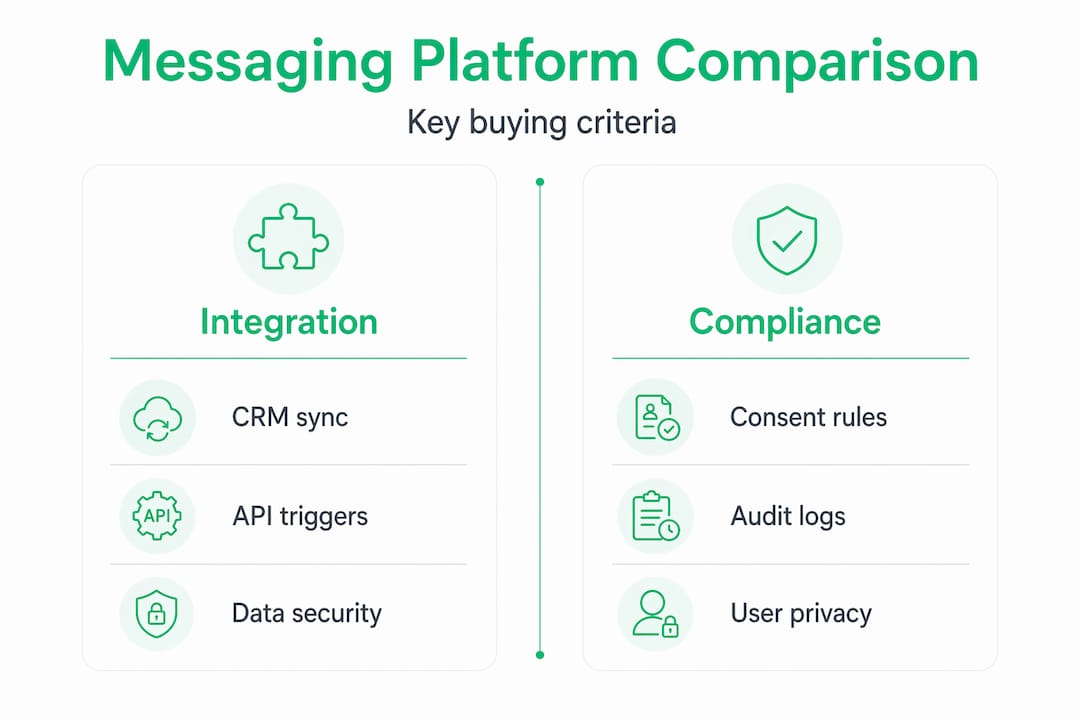
Pro Tip: Before signing any contract, test the platform’s webhook or Zapier integration against your actual CRM data. A 30-minute proof of concept will tell you more than any feature comparison document.
How to implement messaging automation step by step
Getting your first automation live does not require months of planning. But it does require doing the steps in the right order.
-
Identify your highest-priority use case. Pick one communication type your team handles manually and repeatedly. Order confirmations, lead follow-ups, and appointment reminders are common starting points because they have clear triggers and measurable outcomes.
-
Choose a platform that fits your current stack. Match the tool to your existing CRM, e-commerce system, or support platform. Integration compatibility is the deciding factor at this stage, not price.
-
Collect and organize contact data with legal consent. Messaging automation requires written user consent and compliance with laws like the TCPA before any message goes out. Build your opt-in process before building your campaigns.
-
Segment your audience. Separate contacts by behavior, purchase history, lifecycle stage, or geography. A new lead and a three-year customer should not receive identical messages.
-
Write your automated messages with personalization and clear CTAs. Use the customer’s name, reference their specific action, and make the next step obvious. Personalized messages with strong CTAs consistently outperform generic broadcasts on click-through rates and conversions.
-
Configure your triggers and scheduling. Define exactly what event fires each message and when. Set delays between messages in multi-step sequences to avoid overwhelming contacts.
-
Test on a small segment before full rollout. Send to 5-10% of your list first. Check for formatting errors, broken links, and timing issues before the full campaign runs.
-
Monitor key metrics and adjust. Track open rates, click-through rates, opt-out rates, and conversion rates. Use that data to refine message timing, copy, and segmentation in each subsequent cycle.
Best practices and pitfalls to avoid
Most automation failures trace back to a small set of repeatable mistakes. Knowing them in advance saves significant cleanup later.
- Respect opt-in and opt-out rules strictly. Sending messages without proper consent is not just a deliverability risk. It is a legal liability under TCPA and similar regulations globally.
- Do not automate everything. High-stakes moments in the customer relationship, like contract renewals, complaints, or VIP onboarding, deserve a human voice. Automation handles volume; people handle nuance.
- Audit your workflows quarterly. Triggered messages set and forgotten become outdated fast. A cart abandonment message referencing a promotion that ended six months ago actively damages trust.
- Watch your message frequency. Over-sending is one of the fastest ways to accumulate opt-outs. Map the full sequence a single customer could receive and evaluate it as a whole, not message by message.
- Secure your data handling. Customer phone numbers and behavioral data flowing through automation platforms require proper access controls, encryption in transit, and documented retention policies.
Pro Tip: Set a monthly calendar reminder to review your highest-volume automated sequences. Check the copy, the links, and the logic. Twenty minutes of review prevents months of silently declining engagement.
My take on where businesses go wrong with this
I’ve watched a lot of businesses implement messaging automation with genuine enthusiasm and then wonder why results plateau after the first few months. The pattern is usually the same. They automate the mechanics but skip the strategy.
What I’ve found is that the teams who get lasting results treat automation as a communication philosophy, not a technical setup task. They ask “what does this customer need to know right now?” before they ask “what tool do I use?” That order matters enormously.
The contrarian view I’d offer is this: the businesses that win with automated messaging are often the ones that automate less than their competitors. They pick four or five high-impact workflows, build them thoughtfully, and measure them obsessively. The businesses that struggle have 40 workflows running simultaneously, half of which nobody on the team can explain anymore.
In my experience, tool selection is also overrated as a decision. Most platforms in this space are capable enough. What separates effective programs from mediocre ones is the quality of the message copy, the precision of the segmentation, and the discipline of the review cycle. A sharp message on an average platform beats a generic message on the best platform every time.
— Axel
How Whatsable helps you put this into practice
If you’ve mapped out the theory and you’re ready to build, the platform you choose will shape how fast you get results.
Whatsable is built specifically for businesses that need WhatsApp automation at scale without the engineering overhead. Whatsable handles unlimited branded messages, automated follow-up sequences, and deep integrations with tools like Zapier, Make, n8n, and Pipedrive, so your existing stack connects without custom development. For internal teams, Whatsable Bot delivers operational alerts and workflow notifications in minutes. Both products include AI-powered chatbots, detailed analytics, and anti-block bulk messaging. Whether you manage a sales team, run a marketing agency, or oversee enterprise communications, Whatsable’s automation platform gives you the infrastructure to run it reliably.
FAQ
What is business messaging automation?
Business messaging automation is the practice of sending pre-built messages through channels like WhatsApp or SMS based on defined triggers, schedules, or customer actions, without manual sending.
How does messaging automation work?
A customer action or scheduled event triggers a pre-built message through an API or platform workflow, which delivers it to the customer’s channel automatically and logs the result for reporting.
What are the main benefits of messaging automation?
The core benefits include time savings from eliminating manual sends, improved engagement through timely and personalized messages, and the ability to scale communication as your business grows without adding headcount.
What compliance rules apply to automated messaging?
Businesses must obtain written user consent before sending automated messages and comply with laws like the TCPA, which also requires processing opt-out requests within 10 business days.
How do I choose between business messaging tools?
Prioritize integration compatibility with your existing CRM or platform, channel support for where your customers are, and analytics depth. A tool that connects cleanly to your stack will outperform a feature-rich platform that doesn’t.
 Elias Navarro
 Mira Okonkwo