 Whatsable






TL;DR:
- WhatsApp appointment reminders use automated, interactive messages through the WhatsApp Business API to improve confirmation rates and reduce no-shows. They follow a two-step sequence and incorporate templates with interactive buttons for quick responses, with automation updating booking systems in real time.
These reminders are classified as utility messages under Meta’s compliance guidelines, which means they sit in a separate category from marketing content. WhatsApp reminders reach customers in an app they already check, and a tap-to-confirm button makes it easy to confirm or reschedule, which helps cut no-shows.
How WhatsApp appointment reminders work in practice
The standard WhatsApp appointment reminder workflow runs on a two-step sequence. The first message goes out 24 hours before the appointment and asks the customer to confirm or reschedule. The second message goes out 2 hours before and focuses on logistics: location, parking, what to bring, and who they will meet. This two-reminder sequence is not arbitrary. It matches the decision window most customers need to either commit or request a change without leaving your slot empty.

How message templates and interactive buttons work
Every reminder sent at scale must use a pre-approved WhatsApp template message. Meta requires this for any business sending automated outbound messages through the WhatsApp Business API. These templates include interactive elements: tap-to-confirm buttons, reschedule buttons, and cancel buttons. Customers do not need to type a reply. One tap sends a structured response back to your system.
How automation handles customer replies
When a customer taps “Confirm,” your system receives a webhook event and updates the appointment status in your CRM or booking software in real time. Webhook integration allows automatic status updates the moment a customer interacts with the message. If a customer taps “Reschedule,” the system can trigger a follow-up flow that presents available slots or routes the request to your team. Cancellations trigger a slot-recovery workflow that can immediately offer the opening to a waitlisted customer.
- Send a 24-hour reminder with a confirm or reschedule button.
- Suppress the 2-hour reminder automatically if the customer already confirmed.
- Send the 2-hour logistics message to all unconfirmed customers.
- Trigger a slot-recovery message to your waitlist when a cancellation comes in.
- Update your CRM or booking system in real time via webhook on every customer interaction.
Pro Tip: Set your automation to suppress the second reminder the moment a customer confirms. Sending a logistics message to someone who already confirmed reads as disorganized and erodes trust.
What compliance and technical requirements apply?
Sending WhatsApp appointment reminders at scale requires the WhatsApp Business API. The consumer WhatsApp app and unauthorized third-party tools cannot send automated outbound messages without violating Meta’s terms of service. Businesses that use workarounds risk permanent account bans.
The core compliance requirements break down into four areas:
- Template approval: Every outbound reminder must use a Meta-approved message template. Templates are reviewed for content before activation.
- Utility classification: Appointment reminders must be classified as utility messages, not marketing messages. This classification determines how Meta routes and charges for the message.
- No promotional content: Sending promotional content within appointment reminders risks lower engagement and Meta account bans. Keep reminders strictly logistical.
- Opt-in requirement: Customers must have opted in to receive WhatsApp messages from your business before you send them any automated outbound communication.
Pro Tip: Before submitting a template for Meta approval, have your legal or compliance team review the content. Following a solid marketing automation checklist before launch catches most common errors early.
How does WhatsApp compare to email and SMS for appointment reminders?
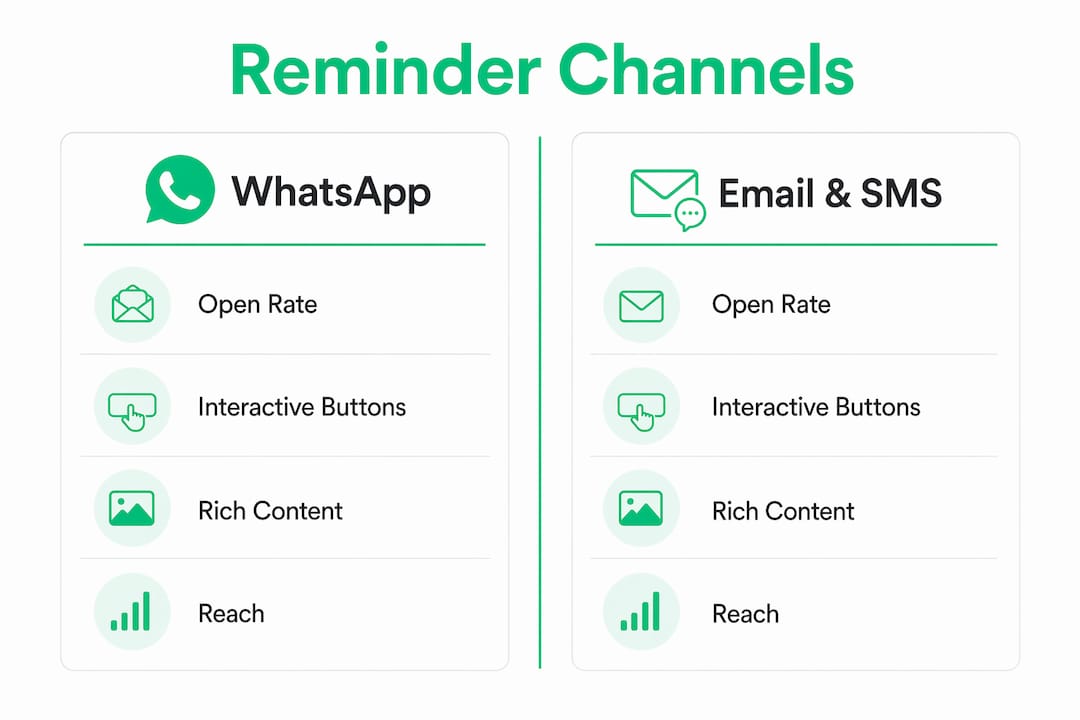
| Channel | Interactive buttons | Rich content | Reach |
|---|---|---|---|
| Yes | Yes (images, location links) | Requires app installation | |
| SMS | No | No | Universal (no app needed) |
| Limited | Yes (HTML) | Universal |
The practical difference shows up in customer behavior. An email reminder requires the customer to open their inbox, read the message, and reply or click a link. SMS requires the customer to type a reply. Each extra step reduces the likelihood of a response.
WhatsApp reminders can include buttons, images and two-way replies in the same chat, which plain SMS can't.
Customer demographics matter here. WhatsApp adoption varies significantly by region and age group. In markets where WhatsApp penetration is high, a WhatsApp-first strategy works well. If many of your customers don't use WhatsApp, plan a separate SMS or email reminder for them from another tool.
What are the best practices for reducing no-shows with WhatsApp reminders?
An optimal sequence involves a confirmation and reschedule reminder about 24 hours prior, followed by a logistics-focused message about 2 hours before the appointment. This balances customer engagement with minimizing annoyance.
- Suppress follow-up messages after confirmation. Effective reminder workflows include logic to suppress subsequent reminders after a customer confirms. Sending a second reminder to someone who already confirmed signals poor organization.
- Include all relevant logistics in the 2-hour message. Address, parking instructions, what to bring, and a contact number for last-minute questions. This message should make the customer feel prepared, not marketed to.
- Keep reminders strictly logistical. Maintaining reminder messages as strictly logistical increases trust and prevents customer disengagement or complaints. A reminder is not an upsell opportunity.
- Test your templates before going live. Send test messages to internal team members across different devices to verify formatting, button behavior, and link accuracy.
Pro Tip: Build a waitlist flow that fires automatically when a cancellation comes in. The moment a slot opens, your system messages the next customer on the waitlist.
Key Takeaways
| Point | Details |
|---|---|
| Two-step timing sequence | Send a confirm/reschedule reminder 24 hours out and a logistics reminder 2 hours before. |
| API and template compliance | Use the WhatsApp Business API with Meta-approved utility templates to avoid account bans. |
| Suppress after confirmation | Stop follow-up reminders the moment a customer confirms to avoid notification fatigue. |
| WhatsApp + SMS (SMS sent from another tool) | Combine WhatsApp for engagement and SMS as a fallback to maximize total reminder coverage. |
Why I think most businesses underestimate the rescheduling step
Most business owners I talk to focus almost entirely on the confirmation button when they set up WhatsApp reminders. They want customers to say yes.
A customer who cannot make their appointment will not always cancel proactively. They will simply not show up. But if you give them a one-tap path to reschedule, they will use it. The slot stays filled, the customer feels respected, and you avoid the awkward follow-up call. That is a better outcome for everyone.
The compliance piece also trips up more businesses than it should. The WhatsApp Business API is not optional for automated outbound messaging at scale. Treat it as a non-negotiable foundation, not an upgrade.
My honest advice: start with the two-step sequence, get your templates approved, and build the suppression logic before you go live.
How to send appointment reminders with Whatsable
Whatsable sends your reminder templates on WhatsApp when your booking tool triggers them through Zapier, Make, n8n or the API, so you can send a reminder the day before and another on the day.
Review the Whatsable pricing plans to find the right fit for your appointment volume and team size.
FAQ
What is a WhatsApp appointment reminder?
A WhatsApp appointment reminder is an automated message sent through the WhatsApp Business API that notifies a customer of an upcoming booking and prompts them to confirm, reschedule, or cancel via interactive buttons.
How do I set up reminders on WhatsApp for my business?
Setting up reminders requires access to the WhatsApp Business API, a Meta-approved utility message template, and an automation platform that connects to your booking or CRM system to trigger messages at the right time.
Why are WhatsApp reminders more effective than email?
WhatsApp reminders reach customers in an app they already check, and a tap-to-confirm button makes it easy to confirm or reschedule, which helps cut no-shows.
Can I include promotions in my WhatsApp appointment reminders?
No. Meta’s compliance guidelines require appointment reminders to be classified as utility messages with strictly logistical content. Including promotional material risks lower engagement and potential account bans.
What happens if a customer does not have WhatsApp?
Whatsable sends reminders on WhatsApp only. If some customers don't use WhatsApp, send their reminders by SMS or email from your booking tool or another service.
 Elias Navarro
 Jonah Reed