 Whatsable







TL;DR:
- WhatsApp automation for international teams requires using the Business Platform API to enable shared inboxes, multi-agent workflows, and regional routing. Proper setup involves working with a verified BSP, configuring routing rules based on time zones and keywords, and respecting the 24-hour conversational window with human escalation. Treating the platform as a full workflow system ensures scalable, compliant, and effective cross-border communication.
WhatsApp automation for international teams is the practice of using the WhatsApp Business Platform (API) to manage cross-border team communication through shared inboxes, routing rules, and AI-powered workflows at scale. Teams spread across Lagos, Berlin, São Paulo, and Singapore no longer need separate phone numbers or manual message forwarding. The WhatsApp Business Platform, accessed through a Business Solution Provider (BSP) like Whatsable, gives distributed teams a single, structured system for handling customer conversations, internal alerts, and automated follow-ups. This guide covers every layer of that system: prerequisites, setup, compliance, and the real-world challenges that trip up global operations.
What does WhatsApp automation for international teams actually require?
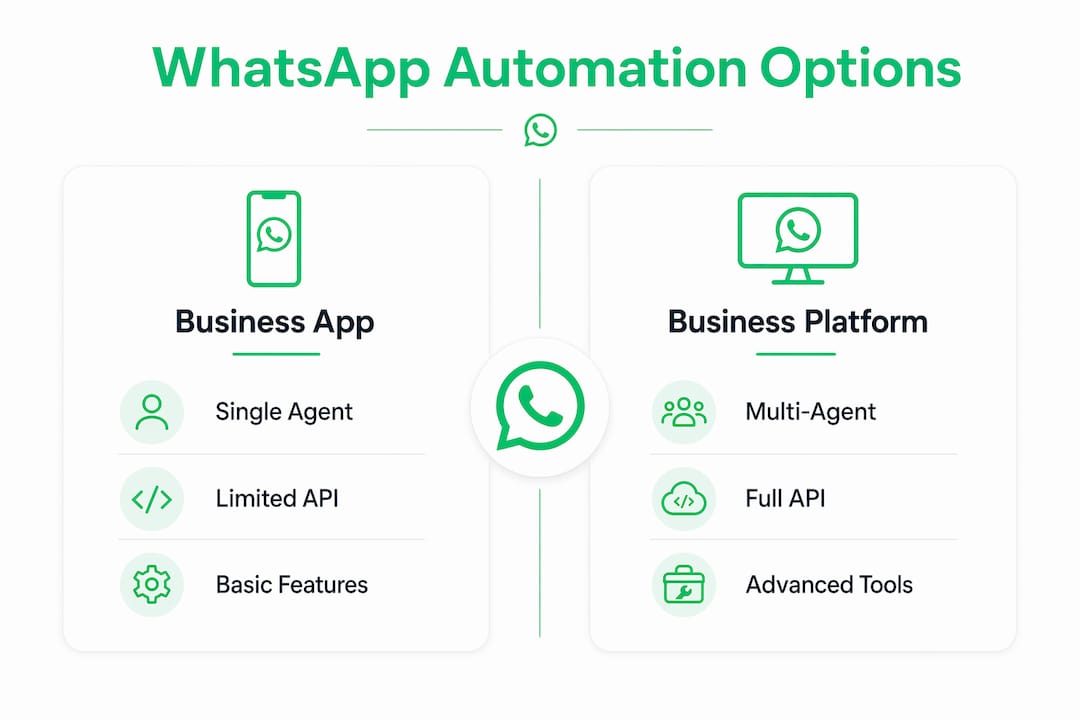
The foundation is the WhatsApp Business Platform, not the consumer WhatsApp Business app. The app limits you to one phone number and up to four linked devices with no real routing, assignment, or automation capability. The API-based Business Platform removes those limits entirely and unlocks shared inboxes, multi-agent workflows, template messaging, and CRM integration.

To get started, you need three things: a verified business account with Meta, a dedicated phone number (or multiple numbers), and access through a BSP. The BSP handles API provisioning, compliance frameworks, and the technical layer between your team and WhatsApp’s infrastructure. Whatsable, for example, provides full API access with a no-code workflow builder, so your operations team does not need a developer to configure routing or automation rules.
Multiple phone numbers can be provisioned for different functions or regions within one unified platform. A company with sales teams in the US and support teams in Southeast Asia can run separate numbers for each function while managing everything from one inbox. This separation prevents message confusion and allows region-specific routing without duplicating effort.
WhatsApp Business app vs. Business Platform: a direct comparison
| Feature | WhatsApp Business App | WhatsApp Business Platform (API) |
|---|---|---|
| Agents per number | 1 phone + 4 linked devices | Unlimited agents |
| Routing rules | None | Keyword, team, round-robin |
| Template messaging | Limited | Full (marketing, utility, auth) |
| CRM integration | None | Zapier, Make, Pipedrive, n8n |
| AI chatbot support | None | Full AI agent capability |
| Analytics and SLA tracking | Basic | Detailed reporting |
The table makes the decision straightforward. Any international team handling more than a handful of daily conversations will hit the ceiling of the Business App within weeks.
Pro Tip: Connect your WhatsApp Business Platform account to a CRM like Pipedrive or HubSpot from day one. Retroactively mapping conversation history to contact records is far more time-consuming than setting up the integration before your first message arrives.
How to set up WhatsApp workflow automation and routing
Setting up automation for an international team follows a clear sequence. Skipping steps, especially routing configuration, is the most common reason teams end up with duplicate replies and frustrated customers.
-
Connect through a BSP. Sign up with a verified BSP like Whatsable and link your WhatsApp Business Account. The BSP handles Meta’s business verification process and provisions your API access, typically within 24 to 48 hours.
-
Create a shared inbox. A shared inbox is the central workspace where all incoming WhatsApp conversations appear. Every agent on your team sees the same queue. No message gets lost in a personal phone.
-
Define routing rules. Routing rules based on keywords, team roles, and time zones are the operational core of any international setup. A message containing “refund” routes to your billing team. A message arriving at 2 AM EST routes to your APAC support queue. VIP customers, identified by a CRM tag, route directly to senior agents.
-
Configure assignment logic. Choose between manual assignment, round-robin distribution, or priority escalation. Round-robin works well for high-volume support. Priority escalation is better for sales teams where deal size determines who picks up the conversation.
-
Enable collision detection and internal notes. Collision detection prevents double replies by showing agents when a colleague is already typing a response. Internal notes let teammates add context to a conversation without the customer seeing it. Both features are non-negotiable for teams operating across time zones.
-
Set after-hours routing. Configure a fallback rule that sends conversations to a queue or triggers an automated acknowledgment message when no agents are online. Pair this with a template message that sets a clear response time expectation.
Pro Tip: Build your routing rules around your team’s actual shift schedule, not an idealized one. If your European team reliably goes offline at 6 PM CET, set the after-hours trigger at 5:45 PM to give agents time to close open conversations before the queue shifts to another region.
How to implement AI automation within WhatsApp’s 24-hour window
The 24-hour customer service window is the single most misunderstood constraint in WhatsApp automation. Inside this window, businesses can send any free-form message. Outside it, only pre-approved template messages are permitted for outbound communication. This timing rule shapes every automation decision you make.
The biggest operational constraint isn’t agent count. It’s the 24-hour session window, which requires automation rules that respect timing and compliance at every step.
Here is how to design AI automation that works within these constraints:
- Train AI agents on your own knowledge base. AI agents trained on your product catalog, pricing, and policies outperform generic FAQ bots significantly. They handle repetitive queries like order status, return policies, and appointment booking without human involvement.
- Build explicit escalation triggers. Define the conditions that hand a conversation to a human: sentiment detection, specific keywords like “lawyer” or “cancel account,” or any query the AI cannot resolve in two attempts.
- Manage session expiry with templates. When a conversation goes quiet and the 24-hour window closes, use a pre-approved utility or service template to reactivate it. Templates fall into four categories: marketing, utility, authentication, and service, each with distinct pricing and approval timelines.
- Never automate without a human fallback. WhatsApp’s policies require that customers can reach a human agent. Burying the escalation option or making it hard to trigger is a compliance risk, not just a customer experience problem.
- Track session timestamps in your platform. Your BSP or inbox tool should display the session expiry time for each conversation so agents know exactly how long they have to respond with a free-form message before switching to a template.
Prompt escalation to a human agent is not optional. It is the mechanism that keeps customer trust intact when automation reaches its limit.
What are the common challenges in cross-border WhatsApp automation?
International teams face a specific set of operational problems that domestic teams rarely encounter. Knowing them in advance saves weeks of troubleshooting.
Time zone conflicts are the most frequent source of dropped conversations. A customer in Tokyo messages at 9 AM JST, which is midnight in London. Without after-hours routing, that conversation sits unassigned until the European team wakes up. The fix is a routing rule that transfers ownership to the nearest active regional queue based on the sender’s time zone or the number they contacted.
Template rejection delays can stall entire campaigns. WhatsApp reviews templates before approving them, and rejections for policy violations or unclear language can take days to resolve. Submit templates at least a week before you need them, and maintain a library of pre-approved templates for common scenarios so your team is never blocked.
Compliance exposure grows with every new region you add. GDPR, data residency rules, and opt-in tracking requirements vary significantly across the EU, Southeast Asia, and Latin America. Most BSPs provide default compliance frameworks, but you are still responsible for verifying that your opt-in collection and data storage practices meet local law.
Analytics gaps make it hard to identify underperforming agents or bottlenecks in routing. A shared inbox with SLA analytics tracks response times and resolution rates per agent and per region. Review these metrics weekly, not monthly, when you are scaling across borders.
Pro Tip: Run WhatsApp alongside Instagram DMs and Facebook Messenger in a unified inbox. Many international customers default to whichever channel they opened first. A multi-channel inbox means your routing rules and automation apply consistently regardless of where the message originates.
Workflow automation tools that integrate directly with the WhatsApp Business Platform, such as those covered in this SMB automation guide, can help you define and automate back-office workflows that connect your messaging layer to your CRM, billing system, or logistics platform.
Key takeaways
WhatsApp automation for international teams works only when the WhatsApp Business Platform is treated as a full workflow system, not a messaging shortcut.
| Point | Details |
|---|---|
| API is non-negotiable | The WhatsApp Business App cannot support multi-agent workflows; the Business Platform API is required. |
| Routing rules drive efficiency | Keyword, team-based, and time-zone routing prevent missed conversations and duplicate replies across regions. |
| The 24-hour window governs everything | Free-form messages are only allowed within the session window; templates are mandatory for outbound contact outside it. |
| AI agents need clear escalation paths | Train bots on your own knowledge base and define explicit triggers for human handoff to stay compliant. |
| Compliance is regional and ongoing | GDPR, opt-in tracking, and data residency rules differ by country and require active monitoring, not a one-time setup. |
Why most teams get WhatsApp automation backwards
I have seen this pattern repeatedly: a business deploys a WhatsApp chatbot, calls it “automation,” and then wonders why customer satisfaction drops within 60 days. The bot handles FAQs competently, but nobody configured escalation paths, nobody set up after-hours routing, and the team is still using personal phones to handle overflow. The automation is real, but the system around it is not.
The WhatsApp Business Platform should be treated as a full team workflow system that combines routing, templates, integration, and reporting. The automation is one layer. The routing logic, the SLA tracking, the human handoff protocols — those are the layers that make automation sustainable across time zones and languages.
My strongest advice for international teams is to start with routing before you start with AI. Get your shared inbox configured, your regional queues defined, and your after-hours policies set. Then layer in AI agents for the highest-volume, lowest-complexity queries. That sequence produces measurable results within the first month. Reversing it produces a chatbot that nobody trusts and agents who work around the system instead of through it.
The 24-hour session window also demands more respect than most teams give it. I have watched companies lose entire customer relationships because an automated message fired outside the window without a pre-approved template, got blocked, and the customer assumed they were being ignored. Build your conversation design around that constraint from the start, not as an afterthought.
— Axel
Get your international team running on Whatsable
Whatsable gives international teams everything described in this article inside one platform. As a verified BSP, Whatsable provides full WhatsApp Business API access with a shared inbox that supports WhatsApp, Instagram DMs, and Facebook Messenger in a single queue. You get no-code routing rules, AI agents trained on your own knowledge base, pre-built template management, and SLA analytics that show exactly how each regional team is performing. Setup takes hours, not weeks, and onboarding support is included. If your team is still managing cross-border messaging through personal phones or disconnected tools, Whatsable is the direct path to a structured, compliant, and scalable operation.
FAQ
What is the WhatsApp Business Platform and why do teams need it?
The WhatsApp Business Platform is the API-based version of WhatsApp designed for businesses that need multi-agent workflows, routing, and automation. Unlike the consumer Business App, it supports unlimited agents, CRM integration, and template messaging at scale.
How does the 24-hour session window affect automation?
Inside the 24-hour window following a customer’s last message, your team can send free-form replies. Outside that window, only pre-approved template messages are permitted, which means your automation must track session expiry and switch message types accordingly.
Can one WhatsApp number support an entire international team?
Yes, the WhatsApp Business Platform allows multiple agents to work from a single number through a shared inbox. You can also provision separate numbers for different regions or functions, such as sales and support, within the same platform.
How do I keep WhatsApp automation compliant across multiple countries?
Work with a BSP that provides built-in compliance frameworks for GDPR and regional data residency rules, maintain documented opt-in records for every contact, and review your template categories regularly to match WhatsApp’s current policy requirements.
What is the fastest way to start automating WhatsApp for a distributed team?
Connect through a BSP like Whatsable, configure a shared inbox with basic routing rules by team and time zone, and deploy AI agents for your top five most common queries. That foundation covers the majority of incoming volume before you add more complex automation layers.

 Mira Okonkwo
 Elias Navarro