 Whatsable







TL;DR:
- A WhatsApp Business onboarding workflow is a structured process that automates client communication and builds trust from the first contact. It relies on complete profiles, targeted automation, and CRM integration to deliver timely, personalized messages. Proper setup emphasizes trust, relevance, and compliance, ensuring effective engagement and customer retention.
A WhatsApp Business onboarding workflow is a structured, step-by-step process that helps businesses establish a professional presence on WhatsApp, automate client communication, and manage conversations from the first contact forward. Done right, it replaces scattered manual follow-ups with a repeatable system that builds trust, cuts response times, and keeps clients moving through your pipeline. Tools like the WhatsApp Business app, the WhatsApp Business API, and CRM platforms like HubSpot each play a distinct role in making this work at scale. This guide walks you through every layer, from initial profile setup to CRM-connected automation sequences.

What is a WhatsApp Business onboarding workflow?
The term “WhatsApp Business onboarding workflow” describes the full setup and automation sequence a business runs to get clients communicating through WhatsApp in an organized, professional way. The industry more commonly calls this a client onboarding via WhatsApp sequence, and both terms refer to the same structured approach. The goal is not just to get WhatsApp installed. The goal is to build a system where every new client receives the right message at the right time, without your team manually sending each one.
WhatsApp API messages are read within three minutes on average, and the platform drives 98% message open rates versus email. That gap in attention is the core reason businesses are moving onboarding communication to WhatsApp. When a welcome message lands and gets read in under three minutes, your client’s first impression of your business is immediate and personal.
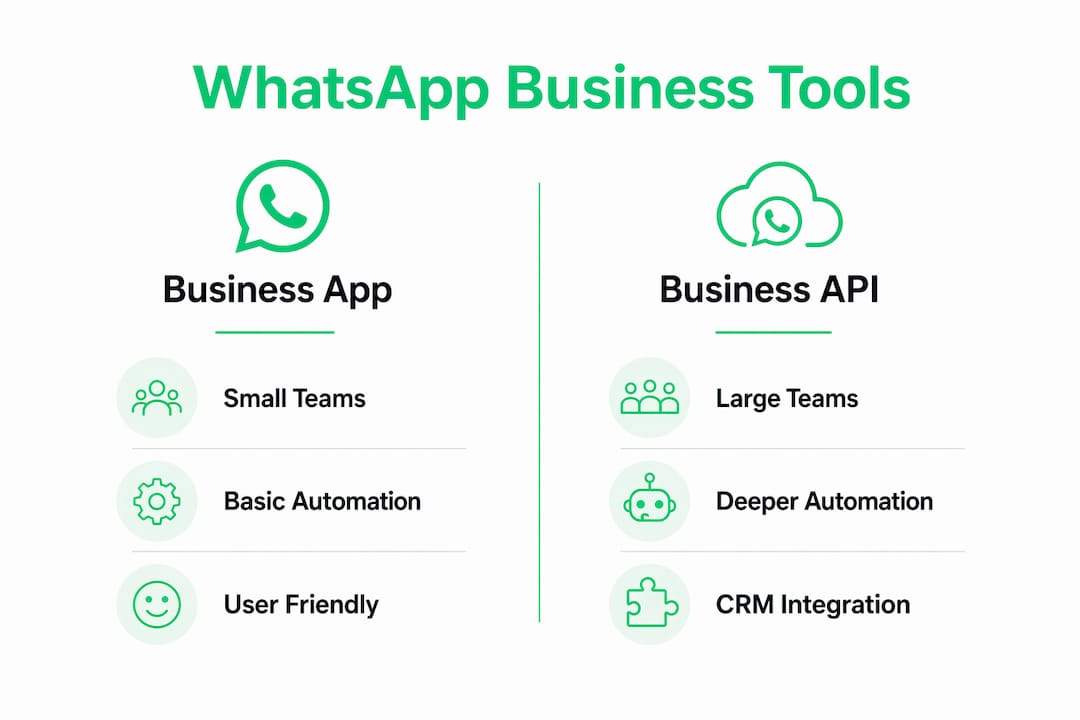
The two main tools for building this workflow are the WhatsApp Business app (best for small teams and solo operators) and the WhatsApp Business API (required for larger teams, automation at scale, and CRM integration). Knowing which one fits your operation is the first decision you make before building anything else.
Essential components and tools for WhatsApp Business setup
Before you build any automation, you need the right foundation. Here is how the two primary options compare:
| Feature | WhatsApp Business App | WhatsApp Business API |
|---|---|---|
| Best for | Small businesses, solo operators | Mid to large teams, high volume |
| Automation | Basic (greeting, away, quick replies) | Advanced (triggers, sequences, CRM sync) |
| CRM integration | Limited | Full (HubSpot, Pipedrive, Zapier, Make) |
| Cost | Free | Paid (via BSP or platform like Whatsable) |
| Message templates | Not required | Pre-approved templates required |
| Multi-agent support | No | Yes |
WhatsApp Business app setup requires phone number verification and a complete business profile. That profile must include your business name, category, logo, operating hours, contact information, and a clear description. Skipping any of these fields signals an incomplete presence and reduces client trust before the first message is even sent.
Beyond the profile, the core automation tools available in the app are:
- Greeting messages: Sent automatically when a client contacts you for the first time or after 14 days of inactivity.
- Away messages: Sent outside business hours, ideally with a specific response time stated.
- Quick replies: Saved responses triggered by keyboard shortcuts, cutting reply time to seconds.
- Chat labels: Color-coded tags (New Customer, Pending Payment, Follow-Up) that organize your inbox by stage.
For teams that need deeper automation, platforms like Whatsable connect the WhatsApp API to tools like Zapier, Make, n8n, and Pipedrive. This is where a basic messaging setup becomes a true onboarding process for WhatsApp that runs without manual input.
How to set up a step-by-step WhatsApp Business onboarding workflow
A structured 7-day onboarding path is the most effective way to build your WhatsApp Business workflow without getting overwhelmed. Each day targets one specific capability, so you build a complete system by the end of the week.
- Day 1: Build your business profile. Add your logo, business category, hours, address, website, and a description that tells clients exactly what you do and who you serve.
- Day 2: Set up automated messages. Write a greeting message that confirms receipt and sets expectations. Write an away message that states your exact response window (e.g., “We reply within 2 business hours”).
- Day 3: Create quick replies. Build at least five saved responses for your most common questions. Pricing, availability, service details, and next steps are the usual starting points.
- Day 4: Apply chat labels. Create labels that mirror your sales or service stages. Tag every existing conversation so your inbox reflects where each client actually stands.
- Day 5: Build your catalog. Start with 5 to 10 items with clear descriptions, prices, and images. The catalog acts as a mobile storefront clients can browse inside the chat.
- Day 6: Create a click-to-WhatsApp ad. Even a small budget ad on Facebook or Instagram that opens directly into a WhatsApp conversation generates qualified leads already opted into messaging.
- Day 7: Establish your daily workflow. Spend 10 minutes each morning reviewing open chats, updating labels, and sending follow-ups. Daily labeling habits prevent missed inquiries and keep your pipeline visible.
For API users, the sequence expands. Automated onboarding sequences include a welcome message, setup reminders, milestone acknowledgments, check-ins, and wrap-up messages, all spaced with delays and conditional flows to improve engagement. Each message in the sequence requires a pre-approved template submitted through your Business Solution Provider.
Pro Tip: Write your away message to include a specific time, not a vague promise. “We’ll reply by 10 AM tomorrow” outperforms “We’ll get back to you soon” every time because it removes uncertainty and keeps clients from messaging competitors while they wait.
How to integrate WhatsApp Business with CRM systems like HubSpot
CRM integration transforms a WhatsApp Business setup guide into a fully automated client onboarding engine. The core benefit is centralized visibility: every WhatsApp message is logged in your CRM, every team member sees the same conversation history, and triggers fire automatically based on client behavior.
HubSpot workflows send WhatsApp messages triggered by deal stage changes and lifecycle updates, with if-then branches that personalize the sequence for each contact. Here is what a practical integration looks like in action:
- A new deal enters the “Proposal Sent” stage in HubSpot. A WhatsApp template message fires automatically: “Hi [Name], your proposal is ready. Here’s what to expect next.”
- The client opens the message but does not reply within 24 hours. A conditional branch triggers a follow-up: “Any questions about the proposal? I’m happy to walk you through it.”
- The client replies. A human handoff trigger notifies the assigned sales rep to take over the conversation personally.
Personalized sequences with human handoff triggers significantly improve customer retention and satisfaction compared to fully automated chains that never involve a real person. The automation handles volume; the human handles relationship.
Time-based delays matter here. Sending three messages in 20 minutes reads as spam. Spacing a welcome message, a setup reminder at 24 hours, and a milestone check-in at 72 hours mirrors how a thoughtful account manager would naturally follow up. Platforms like Whatsable support these delay and branching configurations natively, without requiring custom code.
Pro Tip: Map your onboarding milestones before you build any workflow. Write down every action a new client needs to take in the first 30 days, then assign a WhatsApp message to each one. Build the automation after the map, not before.
What are best practices and common mistakes in WhatsApp onboarding?
Building trust matters more than volume in the first seven days of any onboarding sequence. Sending too many messages too fast trains clients to ignore you. The goal is relevance, not frequency.
The most common mistakes businesses make when setting up their onboarding process for WhatsApp fall into three categories: technical errors, messaging errors, and compliance errors.
Technical errors include skipping phone number verification, submitting message templates without following WhatsApp’s formatting guidelines, and failing to test automated messages before going live. Template rejections are common and can delay your entire sequence by days.
Messaging errors include sending generic blasts to every contact regardless of where they are in the journey. If-then branching outperforms generic delayed messaging in customer engagement because it responds to what the client actually did, not what you assumed they would do. A client who already completed onboarding step one should not receive a reminder to complete step one.
Compliance errors are the most serious. Every contact in your WhatsApp sequence must have opted in to receive messages from you. Every sequence must include a clear opt-out path. WhatsApp enforces these rules and will restrict accounts that generate high block rates.
“The businesses that get the most from WhatsApp onboarding are not the ones sending the most messages. They are the ones sending the right message at the right moment to the right person.” — WhatsApp for Business onboarding guidance
For automated text reply systems to work long-term, daily maintenance is non-negotiable. Spend five minutes each day reviewing label accuracy, checking for unanswered chats, and confirming that automated sequences are firing correctly. A workflow that breaks silently is worse than no workflow at all.
Key takeaways
A WhatsApp Business onboarding workflow works when it combines a complete business profile, targeted automation, CRM integration, and daily inbox discipline into one repeatable system.
| Point | Details |
|---|---|
| Start with the profile | Complete every field in your WhatsApp Business profile before building any automation. |
| Use the 7-day setup path | Build one capability per day to avoid setup paralysis and launch a working system fast. |
| Match tool to team size | Use the WhatsApp Business app for small teams; use the API with a platform like Whatsable for scale. |
| Integrate with your CRM | Connect WhatsApp to HubSpot or Pipedrive to trigger messages from deal stage changes automatically. |
| Prioritize trust over volume | Space messages with delays, use if-then logic, and always include an opt-out option. |
What I’ve learned from building WhatsApp onboarding workflows
The biggest mistake I see businesses make is treating WhatsApp like email with a higher open rate. They take their existing email drip sequence, paste it into WhatsApp templates, and wonder why clients start blocking them after day three.
WhatsApp is a personal channel. Clients give you access to their phone, not their inbox. That distinction changes everything about how you write, how often you send, and when you hand off to a human. The workflows I’ve seen perform best are the ones where automation handles the logistics (confirmations, reminders, milestone checks) and a real person handles the relationship moments (questions, concerns, upsells).
I’ve also found that the CRM integration step is where most teams stall. They set up the WhatsApp Business profile correctly, they write good templates, and then they try to connect it to HubSpot and hit a wall of technical configuration. My recommendation: map your onboarding milestones on paper first. Know exactly which client action should trigger which message before you touch a single workflow builder. The technical setup becomes straightforward once the logic is clear.
One more thing worth saying directly: follow-up automation only works if your initial message earns a response. Write your welcome message as if you are texting a client you already know. Formal, corporate language kills engagement on WhatsApp faster than any technical error ever will.
— Axel
How Whatsable simplifies your WhatsApp onboarding workflow
Building an efficient WhatsApp onboarding workflow from scratch takes time, especially when you need API access, CRM connections, and automated sequences all working together.
Whatsable gives you the infrastructure to run all of it from one platform. Whatsable handles unlimited branded WhatsApp messages, automated follow-up sequences, and direct integrations with Zapier, Make, n8n, and Pipedrive. The Whatsable Bot covers internal team notifications so your team stays aligned without extra manual updates. If you want a branded solution, the whitelabel option lets agencies and larger teams deploy the full platform under their own brand. Start automating your WhatsApp Business onboarding workflow today at Whatsable.
FAQ
What is a WhatsApp Business onboarding workflow?
A WhatsApp Business onboarding workflow is a structured sequence of automated and manual messages that guides new clients through your service or product from first contact to full engagement. It typically includes a welcome message, setup reminders, milestone check-ins, and a human handoff trigger.
Do I need the WhatsApp API for onboarding automation?
The WhatsApp Business app supports basic automation like greeting messages and quick replies, which is enough for small teams. For CRM integration, conditional branching, and high-volume sequences, the WhatsApp Business API is required.
How do I connect WhatsApp Business to HubSpot?
You connect WhatsApp to HubSpot through a Business Solution Provider or a platform like Whatsable, which maps deal stage changes and lifecycle updates to pre-approved WhatsApp message templates that fire automatically.
What message open rates does WhatsApp deliver compared to email?
WhatsApp API messages achieve 98% open rates, and messages are read within three minutes on average. Email open rates typically sit far below that threshold, making WhatsApp significantly more effective for time-sensitive onboarding communication.
What are the most common WhatsApp onboarding mistakes?
The three most common mistakes are sending generic message blasts without if-then personalization, skipping opt-in compliance, and failing to include a human handoff trigger for clients who need direct support during onboarding.
 Elias Navarro