 Whatsable






TL;DR:
- Registering a verified phone number on day one ensures seamless WhatsApp Business account activation in Europe, preventing verification failures.
- A real, SMS-capable mobile number and explicit GDPR consent are essential before building your customer messaging system to comply with legal and platform policies.
WhatsApp Business number registration in Europe is the process of linking a verified phone number to a WhatsApp Business account, then meeting both Meta’s platform policies and the EU’s GDPR requirements before you can legally message customers. The official path runs through either the WhatsApp Business App for small operations or the WhatsApp Business API for teams that need automation and scale. Getting this right from day one determines whether your account stays active, your messages reach inboxes, and your business avoids regulatory exposure.
What are the essential prerequisites for WhatsApp Business number registration in Europe?
Before you touch the app, you need the right inputs. Missing any one of these prerequisites is the most common reason European entrepreneurs stall at the registration stage.
Phone number requirements
The number you register must be capable of receiving an SMS or an automated voice call. VoIP and virtual numbers like Google Voice or Skype cannot receive WhatsApp verification codes and will fail setup entirely. This rules out a large category of numbers that European businesses often use for cost reasons.
Business documentation for Meta verification

If you want the green verified checkmark, Meta requires a Meta Business Portfolio with a linked phone number, business website, and supporting business documents. The green badge review takes 3 to 7 days. Most small and medium enterprises operate without it, but the verification tier you reach affects your messaging limits and trust signals.
GDPR opt-in preparation
You cannot legally message EU contacts on WhatsApp without documented opt-in consent. GDPR requires explicit opt-in specifically for WhatsApp marketing, separate from any general marketing consent you already hold. Build your consent capture mechanism before you register, not after.
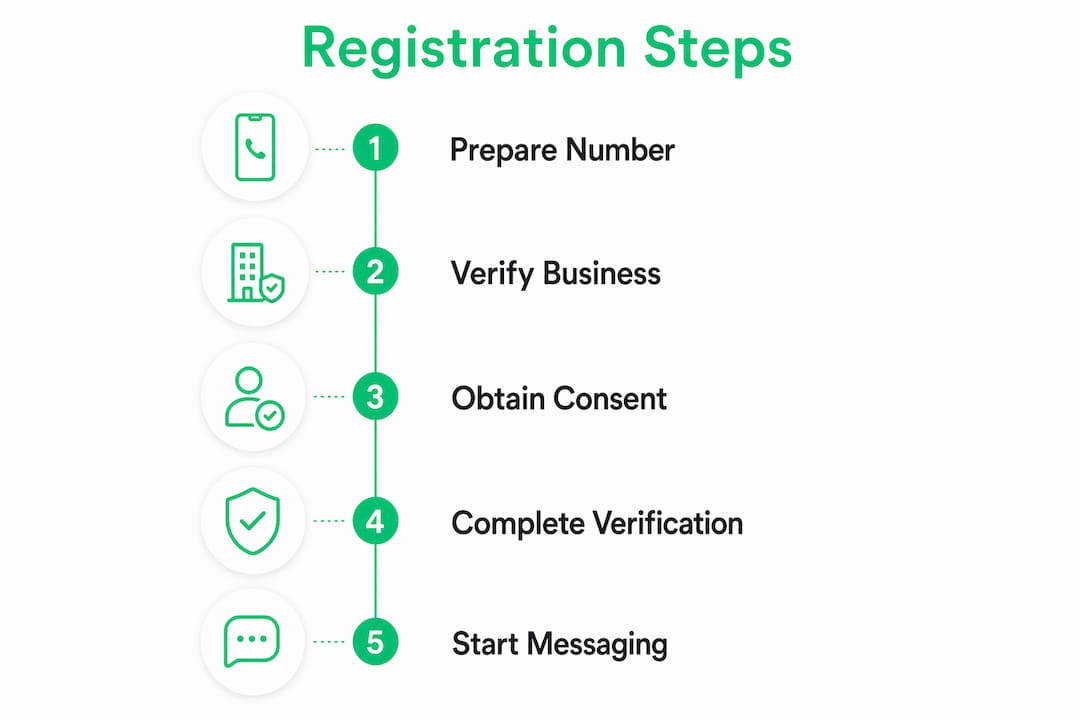
Here is a quick overview of what you need before starting:
| Requirement | Details | Tools or sources |
|---|---|---|
| Real mobile number | Must receive SMS or voice calls | Local SIM, business mobile plan |
| Meta Business account | Required for API and verification tiers | Meta Business Suite |
| Business documentation | Legal name, address, website | Company registration documents |
| GDPR consent mechanism | Explicit WhatsApp-specific opt-in | Web forms, CRM opt-in flows |
| Dedicated number | Not active on personal WhatsApp | Separate SIM or number |
Pro Tip: Test your chosen number by sending yourself an SMS from another device before starting registration. If the SMS arrives within 30 seconds, the number is ready. If it takes longer or fails, switch numbers before you begin.
How to complete the WhatsApp Business number verification process
The WhatsApp Business App onboarding follows a fixed sequence: number entry, CAPTCHA, then a 6-digit SMS or voice call code. Each step has a failure point worth knowing in advance.
- Download the official app. Install WhatsApp Business from the Google Play Store or Apple App Store. Do not use third-party APK sources. For the API route, start through a Meta-approved Business Solution Provider instead.
- Select your country code. European numbers require the correct country prefix. Germany uses +49, France uses +33, Spain uses +34, and so on. Entering the wrong prefix is a common error that delays verification by forcing a full restart.
- Enter your business phone number. Type the number without the leading zero. WhatsApp strips it automatically in some regions but not all, so omitting it manually is safer.
- Complete the CAPTCHA verification. This is a standard bot-prevention step. Complete it on the same device and network you plan to use for the account.
- Choose SMS or voice call delivery. WhatsApp sends a 6-digit code. SMS arrives faster in most European countries. The voice call option is useful when SMS delivery is unreliable on certain networks.
- Enter the 6-digit code. You have a limited window to enter it. If it expires, request a new code. WhatsApp rate-limits these requests, so avoid requesting multiple codes in quick succession.
- Set up your business profile. Add your business name, category, address, and description. This information is visible to customers and affects how your account appears in search.
Verification method comparison
| Method | Speed | Best for | Common failure reason |
|---|---|---|---|
| SMS | Fast (under 60 seconds) | Most European mobile numbers | Number not SMS-capable |
| Automated voice call | Slower (1 to 3 minutes) | Landlines, weak SMS networks | Call blocked by carrier |
Verification failures most often occur when the number is already active on a personal WhatsApp account. WhatsApp cannot run a personal and business account on the same number simultaneously. Deactivate the personal account on that number first.
Pro Tip: If SMS delivery fails twice, wait 10 minutes before requesting the voice call option. Carriers sometimes flag rapid verification requests as spam, which delays delivery further.
What are the compliance and policy requirements for European WhatsApp Business accounts?
Compliance is not optional and it is not a post-registration concern. Two frameworks govern your WhatsApp Business account in Europe: the WhatsApp Business Messaging Policy and the GDPR.
WhatsApp Business Messaging Policy
The WhatsApp Business Messaging Policy requires businesses to hold all necessary licenses and permits for their industry. This applies regardless of what local law permits. If your messaging permissions lapse or your business license expires, WhatsApp can require you to stop messaging entirely. The policy also prohibits messaging in certain regulated verticals, including some financial services and pharmaceutical categories, even when local regulators have approved your business to operate.
“Despite holding local business licenses, WhatsApp policy compliance remains mandatory and can override local approvals if messaging conditions are not met.” — WhatsApp Business Messaging Policy
GDPR consent: two layers, not one
For marketing messages sent through the WhatsApp Business API in the EU, you need two separate permissions. The first is a WhatsApp-specific opt-in from the contact. The second is a valid GDPR legal basis for processing their data. These are not interchangeable.
The legal basis differs by message type:
- Transactional messages (order confirmations, shipping updates, appointment reminders): legitimate interest or contract performance can apply.
- Marketing messages (promotions, offers, newsletters): explicit, separate consent is required. Bundled opt-ins or pre-ticked boxes do not satisfy EDPB rules.
Capturing GDPR-compliant consent as part of your initial registration workflow reduces risk significantly. Retrofitting consent capture after you have already built a contact list is far more disruptive and legally precarious.
What are the best practices for choosing and managing your business WhatsApp number?
The number you register is not just a contact point. It is the permanent identity anchor of your WhatsApp Business account. Changing it later requires a formal migration process that can disrupt customer conversations, break integrations, and reset your messaging reputation.
Mobile vs. landline vs. virtual numbers
- Mobile numbers are the most reliable choice. They receive SMS and voice calls without issue and work across both the app and API.
- Landline numbers can work with the voice call verification method. They are a legitimate option for businesses that want a fixed geographic identity, but they cannot receive SMS, so the verification path is narrower.
- Virtual numbers from providers like Twilio or MessageBird cost around €1.50 per month for a local European number. They work for transactional messaging but must be tested thoroughly before committing. Some banks and government platforms reject virtual numbers for two-factor authentication, which can create problems if your business workflows depend on those services.
Number stability and long-term planning
The permanent identity nature of a WhatsApp Business number means you should treat it like a domain name. Choose a number you intend to keep for years. If your business grows and you move to the API, the same number migrates with you. If you change numbers, you lose your chat history with customers and must re-establish trust signals.
Separate your personal and business WhatsApp accounts from the start. Running both on the same number is technically impossible and attempting it causes verification failures. Use a dedicated SIM or a separate business mobile plan for your WhatsApp Business number.
Before you finalize registration, send a test SMS to the number from two different carriers. Confirm the number is not already registered on any WhatsApp account. Check that your business name and category are accurate, since these affect how customers find and recognize you.
Key takeaways
Successful WhatsApp Business number registration in Europe requires a real, SMS-capable number, documented GDPR consent, and full compliance with WhatsApp’s Messaging Policy before you send a single message.
| Point | Details |
|---|---|
| Use a real mobile number | VoIP and virtual numbers fail WhatsApp verification; use a number that receives SMS or voice calls. |
| Separate personal and business accounts | A number active on personal WhatsApp cannot be used for business registration simultaneously. |
| Capture GDPR consent before launch | WhatsApp-specific opt-in must be separate from general marketing consent under EDPB rules. |
| Treat your number as a permanent identity | Changing your registered number requires a formal migration and disrupts customer history. |
| Know your message type legal basis | Transactional messages and marketing messages require different GDPR legal bases in the EU. |
Why I’d register the number before building anything else
Most European entrepreneurs I’ve spoken with treat WhatsApp Business registration as a technical afterthought. They build the CRM, design the customer journey, set up the automations, and then try to register the number at the end. That sequence causes real problems.
The number is the foundation. If verification fails because you chose the wrong number type, or if your GDPR consent mechanism is not ready, you cannot legally or technically use anything you built. I have seen businesses spend weeks on API integrations only to discover their chosen virtual number does not pass WhatsApp’s verification check.
My advice: register the number on day one, even if you are not ready to send messages yet. This gives you time to troubleshoot verification issues, complete Meta Business verification if you want the green badge, and build your consent capture flows while the account is already live. The 3 to 7 day Meta review window alone is a reason to start early.
The GDPR piece is where I see the most overconfidence. A general marketing opt-in on your website does not cover WhatsApp. The European Data Protection Board is explicit on this. Build a WhatsApp-specific consent checkbox into every lead capture form from the beginning. Retrofitting it later means going back to your entire contact list and asking again, which most contacts ignore.
One more thing: if you plan to scale to the API eventually, choose your number with that in mind. The migration from the app to the API is straightforward when you have planned for it. It becomes a disruption when you have not.
— Axel
How Whatsable helps you go from registered to fully operational
Once your number is verified and your GDPR consent flows are in place, the next challenge is turning that registration into a real customer communication system. That is where Whatsable comes in.
Whatsable connects directly to your verified WhatsApp Business number and lets you send unlimited branded messages, build automated follow-up sequences, and integrate with tools like Zapier, Make, n8n, and Pipedrive. The Whatsable Bot handles internal team notifications so your staff stays informed without manual effort. Both products are built for European businesses that need compliant, scalable messaging from day one. If you have just completed your WhatsApp Business setup in Europe, Whatsable is the logical next step.
FAQ
Can I use a virtual number for WhatsApp Business registration in Europe?
Virtual numbers from providers like Twilio or MessageBird can work for transactional messaging, but they must be tested before committing. Many virtual numbers fail WhatsApp’s SMS verification check, so always confirm the number receives codes before building workflows around it.
What is the difference between the WhatsApp Business App and the WhatsApp Business API?
The WhatsApp Business App is a free mobile application suited for small businesses managing conversations manually. The WhatsApp Business API is a developer-level integration for businesses that need automation, bulk messaging, and CRM connections, and it requires a Meta-approved Business Solution Provider.
Do I need separate GDPR consent for WhatsApp marketing in the EU?
Yes. EU businesses must capture a clear, documented WhatsApp-specific opt-in for marketing messages, separate from any general marketing consent. Bundled or pre-ticked opt-ins do not satisfy EDPB requirements.
How long does Meta Business verification take for the green checkmark?
The Meta Business Portfolio review for the verified green badge takes 3 to 7 days. Most small and medium businesses operate without it, but higher verification tiers unlock higher messaging volume limits.
What happens if I change my WhatsApp Business number after registration?
Changing your registered number requires a formal migration process. Without planning, this causes service interruptions, loss of chat history with customers, and potential disruption to any API integrations tied to the original number.

 Jonah Reed
 Elias Navarro
 Mira Okonkwo