 Whatsable







WhatsApp payment alerts deliver immediate, verified payment confirmations and fraud notifications that reduce fraud exposure, accelerate dispute resolution, and cut inbound support volume. The role of local payment alerts via WhatsApp is straightforward: get the right financial signal to the right customer in under five seconds, in a channel they already check dozens of times a day. According to the WhatsApp Business Platform, implementations using server-side webhooks and real-time event processing can achieve sub-5-second latency for critical notifications. That speed is the difference between a customer catching fraud in the moment and discovering it three days later on a statement.

Three components make this work in production: the WhatsApp Business Platform (approved utility templates), the WhatsApp Business API or Cloud API (the delivery layer), and a server-side backend with webhook listeners, a payment lookup API, and opt-in/consent management. Skip any one of these and you get either a compliance problem or a fragile automation that fails silently.
Critical alerts to send immediately:
- Payment confirmation (amount, merchant, last 4 digits, order ID)
- Suspicious-activity alert (flagged transaction with Confirm/Dispute quick replies)
- Failed payment notification (with retry or support link)
Immediate next step: map each of these business events to an approved utility template before writing a single line of integration code.
Table of Contents
- How local payment alerts via WhatsApp reduce fraud and build customer trust
- Security, privacy, and compliance checklist for U.S. firms
- How to integrate WhatsApp payment alerts with payment systems
- Design rules for payment alert messages that actually work
- What to measure and how payment alerts change operations
- Common pitfalls and how to avoid them before launch
- Rollout timeline and cost model for U.S. deployments
- E-E-A-T research summary: measured impact and recommended architecture
- Key Takeaways
- What most teams get wrong about WhatsApp payment alerts
- Whatsable makes compliant payment alert rollouts faster
- Useful sources and further reading
- FAQ
How local payment alerts via WhatsApp reduce fraud and build customer trust
The most direct business case for WhatsApp payment notifications sits at the intersection of fraud containment and customer experience. When a transaction fires, a confirmed alert reaching the customer within seconds turns the customer into a real-time fraud detector. If the charge is unauthorized, they tap “Dispute” before the merchant even settles. That window matters enormously in card-not-present fraud scenarios common in U.S. e-commerce.

Over 90% of global online adults say they value receiving security notifications, including fraud alerts and payment confirmations, via messaging platforms. WhatsApp sits at the top of that preference stack because it is a familiar, high-trust interface, not a generic SMS string from an unknown short code.
Primary use cases and their operational payoff:
- Real-time fraud alerts: A flagged transaction triggers an immediate WhatsApp message with quick-reply buttons (“This was me” / “Dispute this”). Customers respond in seconds rather than calling a 1-800 number, which cuts fraud containment time and reduces chargeback exposure.
- Instant payment confirmations: Post-settlement confirmations replace the “did my payment go through?” support call. Automating these reduces call-center volume by giving customers frictionless in-chat access to transaction status.
- Receipts and PDF links: A utility template can include a secure link to a hosted receipt PDF, eliminating the need for customers to log into a portal for routine documentation.
- Payment reminders: Due-date reminders sent 72 hours and 24 hours before a bill due date reduce late payments without requiring a human agent touch.
- One-click dispute or confirm actions: Quick-reply buttons embedded in the template let customers take action without leaving WhatsApp, which drives higher engagement than email CTAs.
A concrete example: a fintech serving independent contractors adapted the pattern used by Indian freelancer platforms, where including client name, invoice ID, amount, and settlement ETA in a single WhatsApp message improved payment visibility and reduced reconciliation friction. Translated to a U.S. context, a payment platform sending gig workers a confirmation with their payout ID, net amount after fees, and expected bank arrival date eliminates frequent “where’s my money?” support tickets. For a practical breakdown of which WhatsApp messages to automate first, that prioritization work pays off before any integration begins.
Security, privacy, and compliance checklist for U.S. firms
Deploying WhatsApp for financial alerts in the U.S. means operating across at least three regulatory frameworks simultaneously: PCI-DSS for card data boundaries, GLBA for banking customer data, and FTC guidance for consumer notices. None of these prohibit WhatsApp as a channel, but all of them constrain what data can appear in a message and how consent is managed.
Pre-production compliance checklist:
- Encryption in transit: WhatsApp uses end-to-end encryption by default. Confirm your backend-to-API transport also uses TLS 1.2 or higher.
- PII minimization in message content: Never transmit a full card PAN, full account number, or Social Security Number in a WhatsApp template. Reference only masked identifiers (last 4 digits, order ID, reference number).
- Consent and opt-in management: GLBA and FTC guidance require clear consumer notice before sending financial alerts via a third-party channel. Collect explicit opt-in at account creation or in-app settings, log the timestamp and method, and honor opt-out requests within one business day.
- Record retention: Store message logs, delivery receipts, and opt-in records for the period your compliance team specifies (commonly 7 years for financial records under GLBA).
- Audit logging: Every template send, delivery event, and action taken (confirm/dispute button tap) should write to an immutable audit log tied to the customer’s account record.
- Access controls: Restrict WhatsApp Business API credentials to backend services only. No human agent should have direct API key access without role-based approval.
- Incident response integration: Map WhatsApp delivery failures and unusual opt-out spikes to your existing security incident runbook.
Message classification matters. Meta distinguishes utility (transactional) messages from marketing messages, and transactional utility messages receive different throughput treatment and policy handling. Mixing a promotional offer into a payment confirmation template is a policy violation that can get your sender account flagged. Keep the channels strictly separate.
Pro Tip: Store only reference identifiers in the WhatsApp message itself, such as order ID and the last 4 digits of a card. Keep full payment details in your secured backend systems and link to a hosted, authenticated receipt page if the customer needs more detail. This approach satisfies PCI-DSS data minimization requirements and keeps your template content clean.
How to integrate WhatsApp payment alerts with payment systems
The architecture that works in production is not complicated, but every shortcut creates a failure mode. Best practice uses the payment gateway webhook as the source of truth, then confirms status via a payment lookup API before sending any WhatsApp confirmation. Sending before that verification step is the single most common cause of “payment confirmed” messages going out for transactions that actually failed.
Integration sequence:
- Payment gateway fires webhook on settlement, failure, or reversal event (e.g.,
local_payment_completed,local_payment_reversedper Braintree’s webhook notification kinds). - Backend service receives and verifies the webhook signature to confirm it is authentic.
- Payment lookup API call confirms current transaction status using the
reference_idorpayment_method_noncefrom the webhook payload. Virtual accounts and webhook notifications provide payer and beneficiary details plus unique tracking fields that make this matching reliable. - Idempotency check: query your message log for the
reference_id. If a confirmation was already sent, skip. This prevents duplicate alerts from retry storms. - Enqueue the WhatsApp template send with mapped variables (amount, merchant name, last 4, order ID, timestamp).
- WhatsApp Business API / Cloud API sends the approved utility template to the customer’s opted-in number.
- Delivery and read receipt callbacks write back to your audit log.
- Fallback trigger: if WhatsApp delivery fails within a defined window (commonly 60 seconds), route to SMS or push notification.
For a deeper technical walkthrough of API integration patterns and webhook handling, that architecture detail is worth reviewing before your engineering team starts sprint planning.
Operational requirements to build from day one: logging at every step, monitoring dashboards for delivery rate and fallback rate, idempotency keys stored per reference_id, a retry queue with exponential backoff, and a manual override process for high-risk events where an agent needs to send or suppress a message. A merchant still must independently verify transaction status for reconciliation; the WhatsApp send is downstream of that verification, never a substitute for it.
Design rules for payment alert messages that actually work
A payment alert that confuses the customer is worse than no alert. The message needs to answer three questions in under 10 seconds: what happened, how much, and what should I do right now.
Content rules:
- Lead with the transaction identifier: amount, merchant name, last 4 digits, and order ID in the first two lines.
- Keep body text under 160 characters where possible. Customers read these on a lock screen.
- Never include promotional language in a utility template. A payment confirmation is not an upsell opportunity.
- Include a TTL (time-to-live) note for OTPs: “This code expires in 10 minutes.”
- Use local date and currency formats. For U.S. customers: MM/DD/YYYY and $USD with two decimal places.
CTA patterns that drive action:
- Quick-reply buttons (“Confirm” / “Dispute”) outperform external links for fraud alert responses because they require zero navigation.
- For receipts, a “View Receipt” button linking to an authenticated, HTTPS-hosted PDF is cleaner than attaching a file.
- Avoid directing customers to external forms for dispute initiation. In-chat quick replies reduce friction and increase response rates.
Timing and cadence:
- Payment confirmation: send immediately on settlement confirmation from the gateway, targeting under 5 seconds from event to delivery.
- Payment reminder: 72 hours before due date, then 24 hours before. A third reminder on the due date itself is appropriate for high-value invoices.
- OTP messages: send with a TTL of 10 minutes maximum and suppress resend until the TTL expires.
Template variable mapping example (utility template structure):
A payment confirmation template might use variables mapped as: {{1}} = customer first name, {{2}} = transaction amount, {{3}} = merchant name, {{4}} = last 4 digits, {{5}} = order ID, {{6}} = transaction date. Meta requires every variable to be populated at send time. An empty variable causes a delivery failure, not a graceful degradation.
Pro Tip: A/B test your CTA button labels before scaling. “Confirm” vs. “This was me” can produce meaningfully different tap rates on fraud alert messages. Track at minimum: message sent, delivered, read, button tapped, and action completed. Those five events give you the funnel data to optimize.
What to measure and how payment alerts change operations
The business case for WhatsApp transaction updates lives in four numbers: delivery rate, read rate, confirmation rate, and call-center deflection. Everything else is diagnostic.
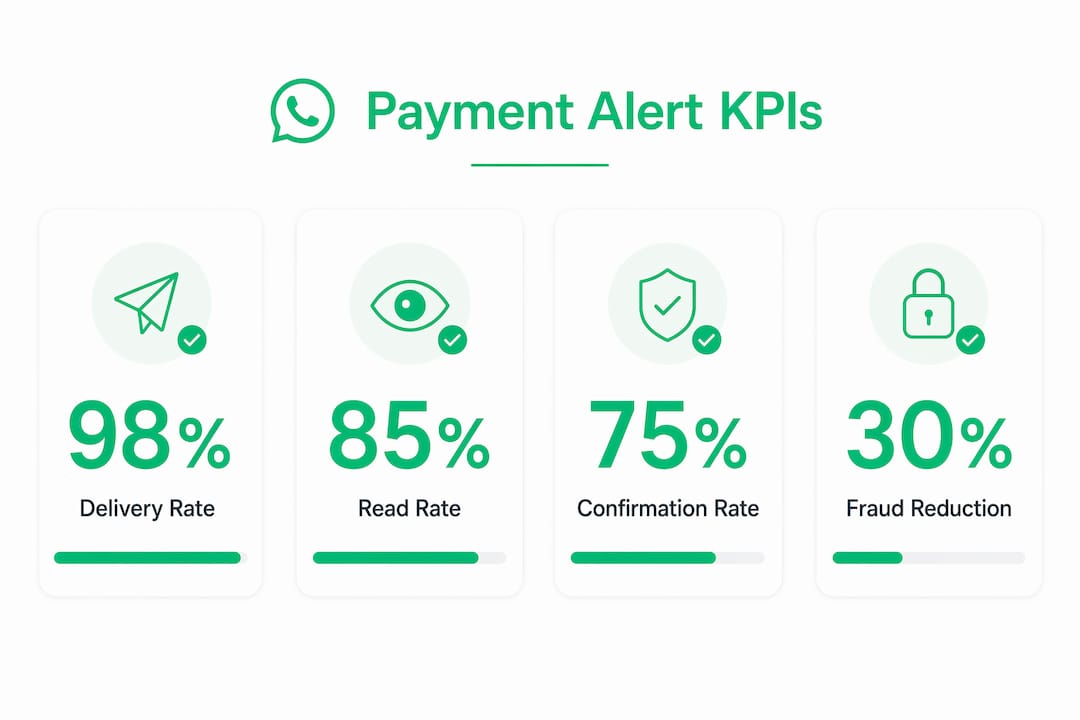
Core KPIs to instrument from launch:
| KPI | What it measures | Target benchmark |
|---|---|---|
| Delivery rate | % of sent messages successfully delivered | — |
| Read rate | % of delivered messages opened | — |
| Confirmation/dispute rate | % of fraud alerts where customer takes action | >60% within 5 minutes |
| Time-to-confirm | Median seconds from send to customer action | sub-5-second latency |
| Call-center deflection | % reduction in payment-related inbound calls | Varies by baseline |
| Fallback rate | % of messages rerouted to SMS/push | <5% |
| Cost per alert | Total channel cost divided by messages sent | Depends on volume tier |
Before/after operational impact (example structure for your org data):
| Metric | Pre-WhatsApp baseline | Post-WhatsApp (pilot) |
|---|---|---|
| Payment-related inbound calls per day | [Your baseline] | [Measured reduction] |
| Median confirmation latency | [Hours/days] | [Minutes/seconds] |
| Late payment rate | [Your baseline %] | [Measured reduction] |
| Fraud dispute resolution time | [Your baseline] | [Measured reduction] |
Instrument each message with an event model: sent, delivered, read, action_taken, fallback_triggered. Tag every event with the order_id or reference_id so you can join message events back to transaction records in your data warehouse.
Pro Tip: To calculate ROI, use this formula: (Fraud losses prevented × fraud containment rate improvement) + (Support cost per call × calls deflected) minus (Total messaging cost + integration development cost). Run this quarterly. The fraud-prevention side of the equation often dwarfs the support-deflection savings, which surprises most teams doing the math for the first time.
Common pitfalls and how to avoid them before launch
Most production failures with WhatsApp payment alerts trace back to one of five root causes. Knowing them in advance is cheaper than discovering them in a post-incident review.
Common pitfalls:
- Sending before reconciliation: Firing a “payment confirmed” message on a client-side event rather than a verified gateway webhook produces false confirmations. Sending before backend verification leads to silent failures and manual cleanup work.
- Incorrect template variable mapping: A template submitted with mismatched or missing variable placeholders will be rejected by Meta. Rejections delay launches by days or weeks.
- No idempotency: Without idempotency keys, a retry storm from your message queue sends duplicate confirmations. Customers receiving three “payment confirmed” messages in 30 seconds lose trust fast.
- Mixing marketing and transactional templates: Promotional content in a utility template violates Meta policy and risks your sender account. Keep separate sender flows for each message category.
- Spoofing and phishing risk: Customers trained to expect WhatsApp payment alerts become targets for spoofed messages. Mitigate by educating customers that your alerts never ask for credentials or full card numbers, and by using WhatsApp’s verified business profile.
Mitigations:
- Server-side webhook signature verification before any downstream action
- Template QA checklist: variable count matches, character limits, no promotional language, correct category classification
- Idempotency key stored per
reference_idbefore enqueue - Automated monitoring for opt-out rate spikes (a sudden spike signals a content or consent problem)
- Pre-send fraud detection: cross-reference the destination number against your known-good opt-in list before sending
Launch readiness checklist:
- Template approval confirmed in WhatsApp Business Manager
- Webhook endpoint verified and signature validation tested
- Fallback channel (SMS/push) configured and tested
- Monitoring dashboards live with alerts on delivery rate drops
- Runbook written for incident handling, including manual override process
- Opt-out handling tested end-to-end
Over 90% of online adults value security notifications via messaging, which means a poorly executed rollout damages a high-trust channel. Getting the launch right the first time protects both the customer relationship and the sender account health.
Rollout timeline and cost model for U.S. deployments
A realistic WhatsApp payment alert rollout for a U.S. financial institution runs 8–14 weeks from kickoff to pilot. Rushing the template approval phase is the most common cause of delays.
Phase-based timeline:
- Discovery and scoping (1–2 weeks): Map business events to alert types, define opt-in flows, confirm regulatory review with compliance team.
- Template design and approval (2–3 weeks): Write utility templates, submit to Meta for approval, iterate on rejections. Budget for at least one revision cycle.
- Integration development (3–4 weeks): Build webhook listeners, payment lookup API calls, idempotency layer, message queue, and fallback routing.
- Testing (1–2 weeks): End-to-end testing in sandbox, load testing the queue, fallback scenario testing, and compliance review of message content.
- Pilot (2 weeks): Deploy to a small cohort (500–2,000 opted-in customers). Measure delivery rate, read rate, and call-center deflection against baseline.
- Scale: If pilot KPIs meet targets, expand to full customer base with monitoring in place.
Cost components:
| Cost item | Typical range / notes |
|---|---|
| WhatsApp Business API setup | Varies by BSP; often included in platform fee |
| Template approval | No direct Meta fee; cost is developer time (1–3 days per template) |
| Message unit cost | Per-conversation pricing from Meta; varies by message category and volume |
| Integration development | 3–6 weeks of engineering time depending on stack complexity |
| Monitoring and ops overhead | Ongoing; typically absorbed into existing DevOps budget |
Pilot success criteria before scaling:
- Delivery rate above 95%
- Read rate above 80%
- Fallback rate below 5%
- Zero duplicate confirmations in a 48-hour window
- No compliance escalations from the pilot cohort
E-E-A-T research summary: measured impact and recommended architecture
The evidence base for WhatsApp payment alerts in financial services is consistent across platform documentation and practitioner implementations. Two findings anchor the business case: over 90% of online adults value security notifications via messaging platforms, and server-side webhook implementations can deliver alerts in under five seconds. Both figures point to the same conclusion: the channel has both the audience and the technical capability to replace slower, lower-engagement alternatives.
The recommended architecture, distilled to a checklist an engineering team can drop into a brief:
- Payment gateway webhook as the authoritative event source
- Webhook signature verification before any downstream processing
- Payment lookup API call to confirm status using
reference_id - Idempotency key check before enqueue
- Approved utility template with correctly mapped dynamic variables
- Delivery and read receipt callbacks to audit log
- Fallback channel triggered on delivery failure
- Separate sender flows for utility (transactional) and marketing messages
Two practitioner-level cautions worth repeating: Meta’s template approval process requires every dynamic variable to be correctly mapped, and submitting templates without proper variable mapping causes rejections that delay launches. Second, maintaining strict separation between marketing and transactional messaging is not just a policy requirement; it protects throughput and sender account health over time. The WhatsApp customer journey for financial services runs through multiple touchpoints, and keeping the transactional channel clean is what makes customers trust the alerts when they arrive.
Key Takeaways
WhatsApp payment alerts reduce fraud exposure and support volume only when built on server-side webhook reconciliation, approved utility templates, and strict separation of transactional and marketing message flows.
| Point | Details |
|---|---|
| Verify before sending | Always confirm transaction status via a payment lookup API before triggering any WhatsApp alert. |
| Keep templates clean | Use utility templates for payment alerts only; never mix promotional content into transactional messages. |
| Instrument from day one | Track delivery rate, read rate, confirmation rate, and call-center deflection as your core pilot KPIs. |
| Plan for template rejections | Budget 2–3 weeks for template approval and at least one revision cycle before your launch date. |
| Whatsable accelerates rollout | Whatsable handles template management, webhook retries, idempotency, and delivery analytics so teams can reach pilot faster. |
What most teams get wrong about WhatsApp payment alerts
The conventional wisdom says the hard part is the integration. It is not. The hard part is discipline after launch.
Teams that build a clean webhook-to-template pipeline and then gradually let marketing messages creep into the transactional sender are the ones who end up with degraded throughput, elevated opt-out rates, and eventually a flagged account. The technical architecture is a solved problem. The organizational discipline to keep it clean is where most implementations quietly fail six months in.
Template rejections also surprise teams that have not done this before. A template that looks perfectly reasonable to a product manager gets rejected because a variable is in the wrong position, or because the body text is ambiguous about whether it is transactional or promotional. The fix is usually minor, but the delay is real. Teams that submit three templates in week one and get two rejected end up pushing their pilot by two weeks. The mitigation is simple: submit templates early, expect at least one revision, and do not build your integration timeline around first-submission approval.
The non-obvious operational hack that saves the most pain: build a manual override process into your pilot from day one. When something goes wrong at 2 AM, a support engineer needs a way to suppress or manually trigger a specific alert without touching production code. That runbook entry, written before launch, is worth more than any monitoring dashboard.
For teams ready to go deeper on the technical side, Whatsable’s blog covers building a WhatsApp notification system via API with the kind of implementation detail that saves engineering hours.
Whatsable makes compliant payment alert rollouts faster
Financial teams that have mapped their events, drafted their templates, and confirmed their compliance requirements still face weeks of integration work before a single alert reaches a customer. Whatsable cuts that gap by handling the infrastructure layer that most teams build from scratch: template management with approval workflow tracking, webhook ingestion with built-in retry logic and idempotency, delivery monitoring with per-message event tracking, and fallback routing when WhatsApp delivery fails.
The platform integrates with Zapier, Make, n8n, and Pipedrive, so payment gateway events can route to WhatsApp alerts without custom middleware in many stacks. Delivery analytics map directly to the KPIs covered above: delivery rate, read rate, and action taken per template. For teams running a pilot, that instrumentation is available from the first message, not after a custom analytics build.
Teams ready to evaluate the platform can review plan options and volume pricing on the Whatsable pricing page and start a trial without a long-term commitment.
Useful sources and further reading
The sources below back the claims in this article and serve as the primary references for teams building their own implementation briefs.
Platform and integration documentation:
- Securing FinServ Transactions: Using Payment Alerts to Drive ROI on WhatsApp — WhatsApp Business Platform blog; primary source for adoption statistics, latency benchmarks, and template policy.
- Receive Payment Notifications — Localpayment webhook documentation; covers webhook payload fields, payer/beneficiary details, and tracking fields for reconciliation.
- Local Payment Methods Webhooks — Braintree/PayPal developer docs; defines webhook notification kinds (
local_payment_completed,local_payment_reversed,local_payment_funded,local_payment_expired).
Practitioner and merchant guidance:
- WhatsApp Support for Payment Gateways: The Complete 2026 Merchant Playbook — Covers gateway configuration, reconciliation requirements, and reference_id usage.
- WhatsApp Notifications After Payment (Auto) — Practical implementation guidance on event mapping, logging, retries, and common failure modes.
- Lead Generation from WhatsApp: Your 2026 Playbook — Broader channel strategy context, including compliance considerations and channel hygiene for WhatsApp programs.
Whatsable technical resources:
- Build a WhatsApp Notification System via API — Architecture walkthrough for webhook handling and reliable notification delivery.
- WhatsApp Business API Integration: A Practical Guide — Step-by-step Cloud API integration requirements for engineering teams.
FAQ
Are payments through WhatsApp secure?
WhatsApp uses end-to-end encryption for messages, and the WhatsApp Business Platform requires approved utility templates for transactional alerts. For U.S. financial institutions, security also depends on what data appears in the message: never include full card numbers or account numbers, and always store full payment details in secured backend systems.
How does payment notification through WhatsApp work?
A payment gateway fires a webhook on a transaction event; a backend service verifies the status via a payment lookup API, then sends an approved WhatsApp utility template to the customer’s opted-in number through the WhatsApp Business API or Cloud API. The customer receives the alert, typically in under five seconds, and can take action via quick-reply buttons.
Why is WhatsApp asking for payment information?
If WhatsApp or a sender is requesting full payment credentials inside a chat, that is a phishing attempt. Legitimate WhatsApp payment alerts from financial institutions reference only masked identifiers (last 4 digits, order ID) and never ask customers to enter card numbers or passwords in the chat.
Do customers need to opt in to receive WhatsApp payment alerts?
Yes. U.S. regulatory guidance under GLBA and FTC consumer notice requirements means financial institutions must collect explicit opt-in consent before sending financial alerts via a third-party messaging channel. Opt-in records, including timestamp and method, should be retained as part of your compliance documentation.
Can WhatsApp payment alerts reduce call-center volume?
Automating transactional alerts on WhatsApp reduces call-center volume by giving customers frictionless in-chat options to confirm transactions, access receipts, or initiate a dispute without calling, as documented by the WhatsApp Business Platform. The impact depends on your baseline call volume and the alert types you deploy, but payment-related inbound calls are among the most automatable support categories.

 Mira Okonkwo
 Jonah Reed